Published May 15, 2025, in if.team blog

Vladyslav Chesnokov
Copywriter if.team

Oleh Frolov
CEO, if.team
The benefits of Professional Services Automation define how modern businesses operate in 2025. Professional Services Automation is a tool for growth, improved efficiency, and stronger control over operational processes. With PSA software, companies manage projects, resources, finances, and analytics in a single digital environment.
A PSA platform enables teams to scale quickly, reduce errors, and increase the transparency of management decisions. A Professional Services Automation system simplifies day-to-day operations, freeing up time for strategic work.
In this article, we’ll break down what PSA is, how it works across different industries, and what opportunities PSA software already offers today.
Professional Services Automation is the process of using technology to automate routine and repetitive tasks related to project management, resource planning, financial operations, and internal communication. The goal is to reduce manual involvement in standard operations while increasing their accuracy, efficiency, and speed.
Typical tasks that get automated include project planning, task management, reporting and invoicing, as well as tracking deadlines and budgets. With a Professional Services Automation system, businesses can centralize all these processes within a single platform. For example, a PSA platform brings all project data into one place, making it easier to manage both projects and teams.
The main benefit is fewer human errors, faster task completion, and the ability to scale the business without expanding the team.
The benefits of Professional Services Automation are becoming increasingly clear for companies in 2025. Implementing Professional Services Automation through PSA software boosts efficiency, saves time, and reduces the risk of errors. As a result, businesses can shift their focus from routine operational work to strategic goals.
The benefits of Professional Services Automation are becoming clear to a wide range of businesses aiming to improve efficiency and reduce costs. In 2025, more companies are adopting Professional Services Automation systems through PSA software to streamline operations. However, not all businesses need the same solutions — it’s important to understand who can get the most value from PSA.
Professional Services Automation has huge potential for IT companies that manage multiple projects and resources. A PSA platform makes it easier to allocate tasks, track progress and expenses, and generate accurate project performance analytics. PSA software also reduces time spent on resource management and ensures full transparency at every stage.
For consulting firms working with large teams and a variety of clients, Professional Services Automation is key to improving productivity. With automated task planning, coordination tools, and financial management features, consultants can manage projects more effectively and deliver higher-quality results. PSA software minimizes time spent on administrative tasks, allowing teams to focus on strategic management.
In fast-paced creative environments, Professional Services Automation helps agencies stay agile and organized. PSA software automates campaign planning, team coordination, and budget tracking. This enables agencies to handle more projects at once without sacrificing execution quality.
Law firms also benefit from Professional Services Automation, especially when it comes to managing client cases, reporting, and billing. A Professional Services Automation system reduces the administrative burden and allows more focus on legal work — significantly improving overall efficiency.
For service companies that deliver custom solutions, Professional Services Automation improves project delivery and client collaboration. PSA software centralizes data and ensures transparency at every step of the customer journey, resulting in better service quality and lower risk.
Less routine — more results
Start your automation journey with if.team today and work more efficiently every day.
The benefits of Professional Services Automation become especially clear when looking at real client examples. Implementing a PSA platform helps companies not only streamline operations but also significantly improve how they manage services. With Professional Services Automation systems, businesses gain control over every stage of a project — from planning to financial analysis — boosting productivity and cutting costs.
PSA software tools integrate all key processes into a single system, helping reduce the time spent on routine tasks and increasing team efficiency. For example, clients like Webnauts demonstrate how PSA solutions can transform project and service management, allowing businesses to work more effectively and adapt quickly to change.
Next, we’ll explore how PSA software has helped companies across different industries automate their workflows and unlock the full benefits of Professional Services Automation.
The benefits of Professional Service Automation (PSA) for IT companies are clearly illustrated by the experience of Webnauts, the first adopters of if.team’s PSA platform. Since switching to the new system, the team of 60+ employees across different locations quickly adapted and discovered the key advantages of PSA for project and financial management.
Thanks to a user-friendly and intuitive interface, onboarding with if.team’s PSA solution took just 15–20 minutes. Each team member completed their profile during registration, and the team quickly learned the core features, such as the task manager in list, kanban, and Gantt chart modes. This made it easy to set up and launch efficient project workflows from day one.
One of the most important advantages for Webnauts was the ability to manage project finances in real time. The company could create projects using both Fixed Price and Time & Material models, break them into iterations, and monitor budgets live. This helped Webnauts cut subscription costs by up to 75%, replacing multiple tools with a single all-in-one solution.
The PSA system allowed Webnauts to combine project management, financial tracking, and operations within a single platform. This significantly optimized the use of project resources. In particular, the financial tracker became a key budgeting tool, reducing the time required for compiling financial reports from 20–30 hours to just 5–6 hours, saving $250–$350 per month on that process alone.
Another valuable feature for Webnauts was the interactive design of the PSA platform. Dashboards, charts, and other analytics tools helped the team quickly identify issues with deadlines, staff, or overspending. This boosted productivity and enabled timely adjustments in project strategy.
After 14 months of using the PSA platform, Webnauts saw measurable improvements in both project and financial management. The if.team system evolved from a project management tool into a comprehensive business management solution, helping the company streamline operations and significantly reduce spending on third-party software.
With the Professional Services Automation platform, Webnauts saved time and effort — laying the foundation for stable growth and long-term operational efficiency.
Play Fusion Labs faced a common challenge: managing projects across multiple tools — Jira, Trello, and even Miro. None of these platforms offered the team a streamlined way to oversee workflows. Due to limited functionality and a complex user interface, they wasted time duplicating tasks, explaining processes, and coordinating between teammates. Implementing a PSA solution became a turning point for the studio.
Before PSA adoption, the team used three different systems: Trello for tracking tasks, Jira for more complex workflows, and Miro for visualizing project stages. As a result, data was scattered, and collaboration was inefficient — a typical scenario for small IT teams.
Switching to a single professional services automation platform allowed the company to centralize all business processes. Instead of constantly jumping between tools, the team gained a single entry point for managing tasks, deadlines, roles, and client interactions.
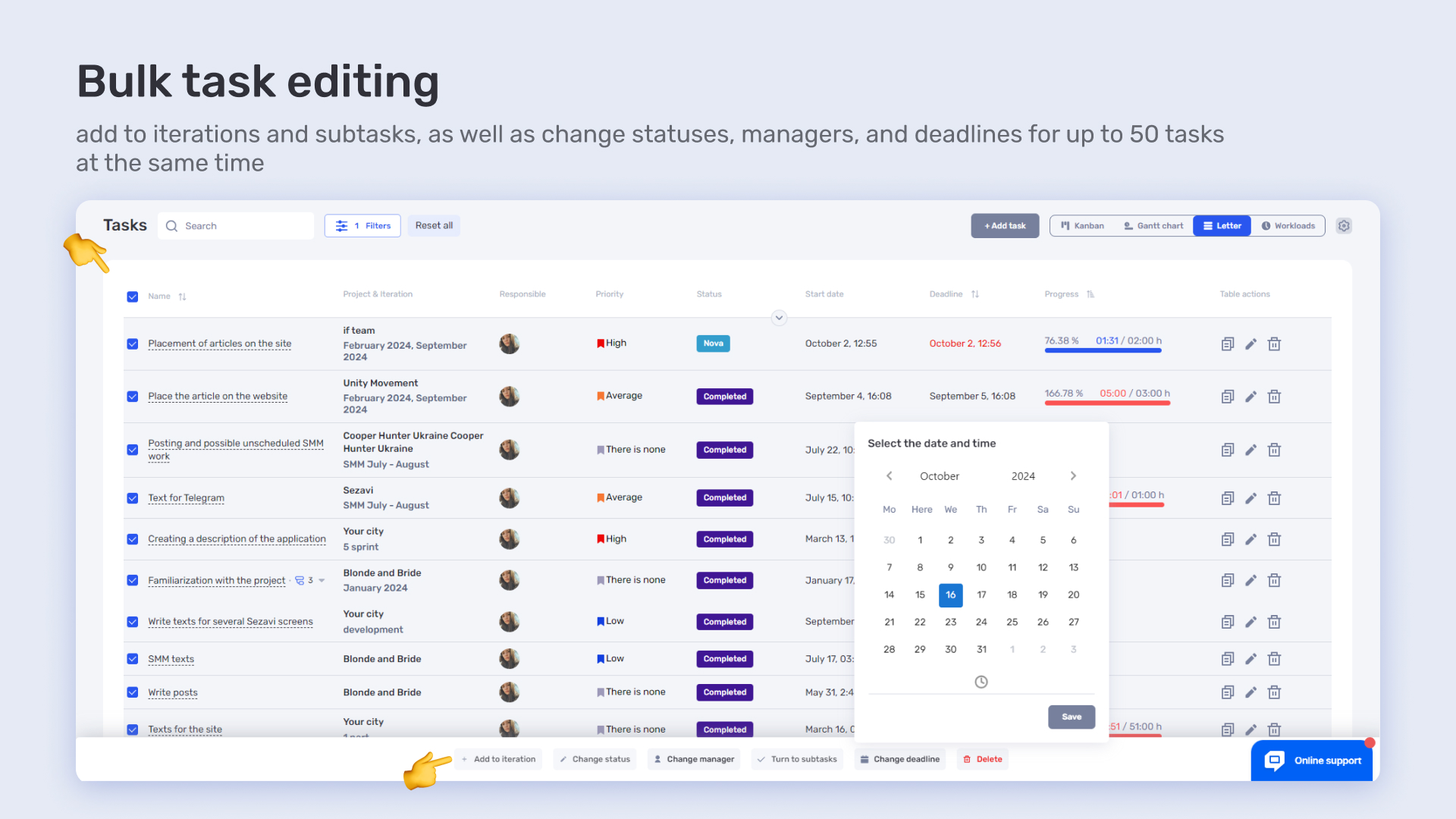
After transitioning to the PSA solution from if.team, Play Fusion Labs immediately felt the benefits of automation. For example, the ability to bulk edit up to 50 tasks at once saved hours of routine work. Additionally, built-in time tracking automatically calculated wages — a particularly helpful feature for teams working with freelancers or hourly pay models.
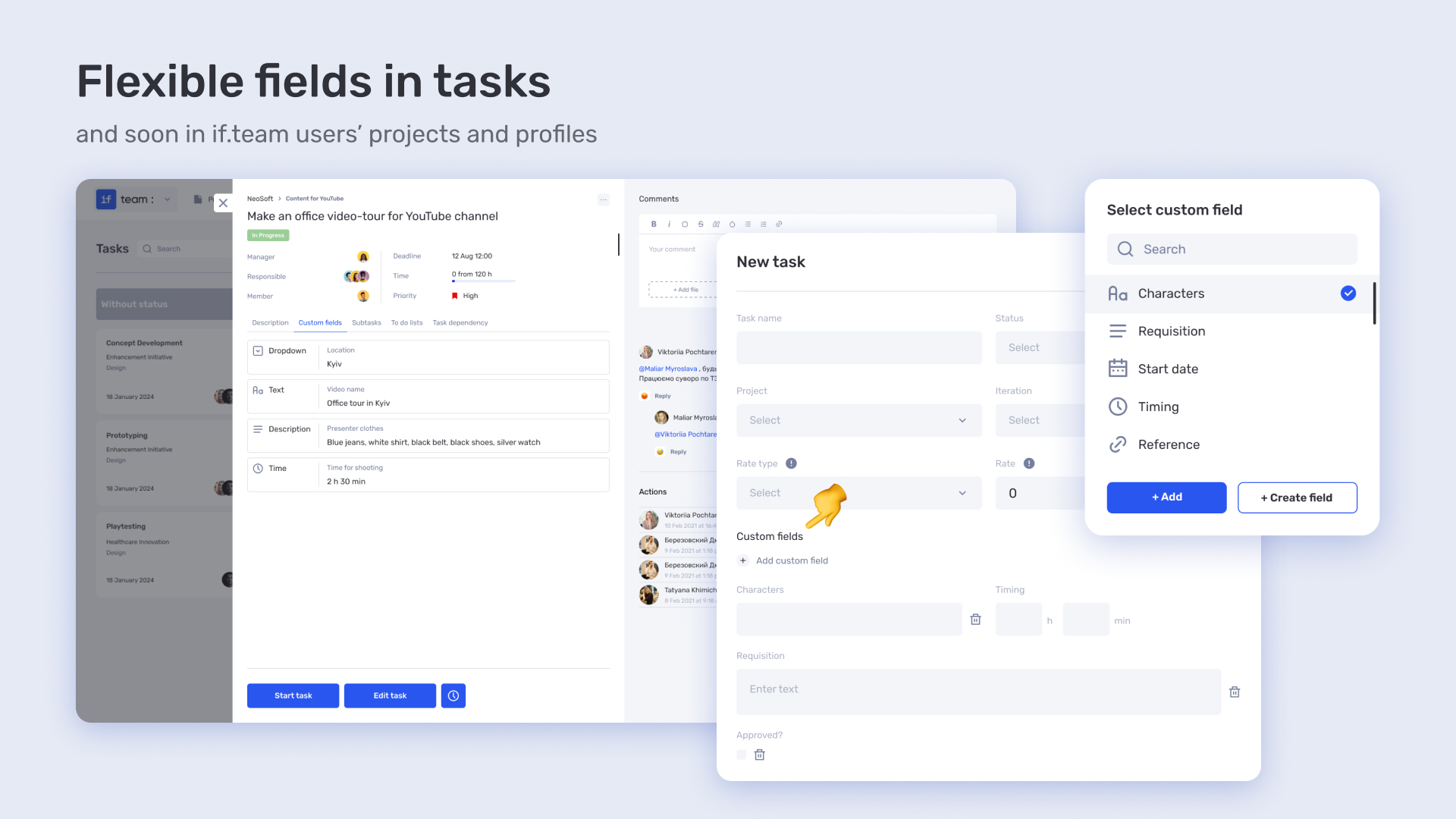
Another advantage was the use of custom fields, which could be configured without technical support. Everything was flexibly tailored to each team’s needs, allowing Play Fusion Labs to adapt the platform without additional costs or integration complexity.
A standout feature of the PSA platform was the ability to involve clients directly in project work. Users could securely grant access to specific projects, improving client coordination, avoiding misunderstandings, and speeding up iteration approvals.
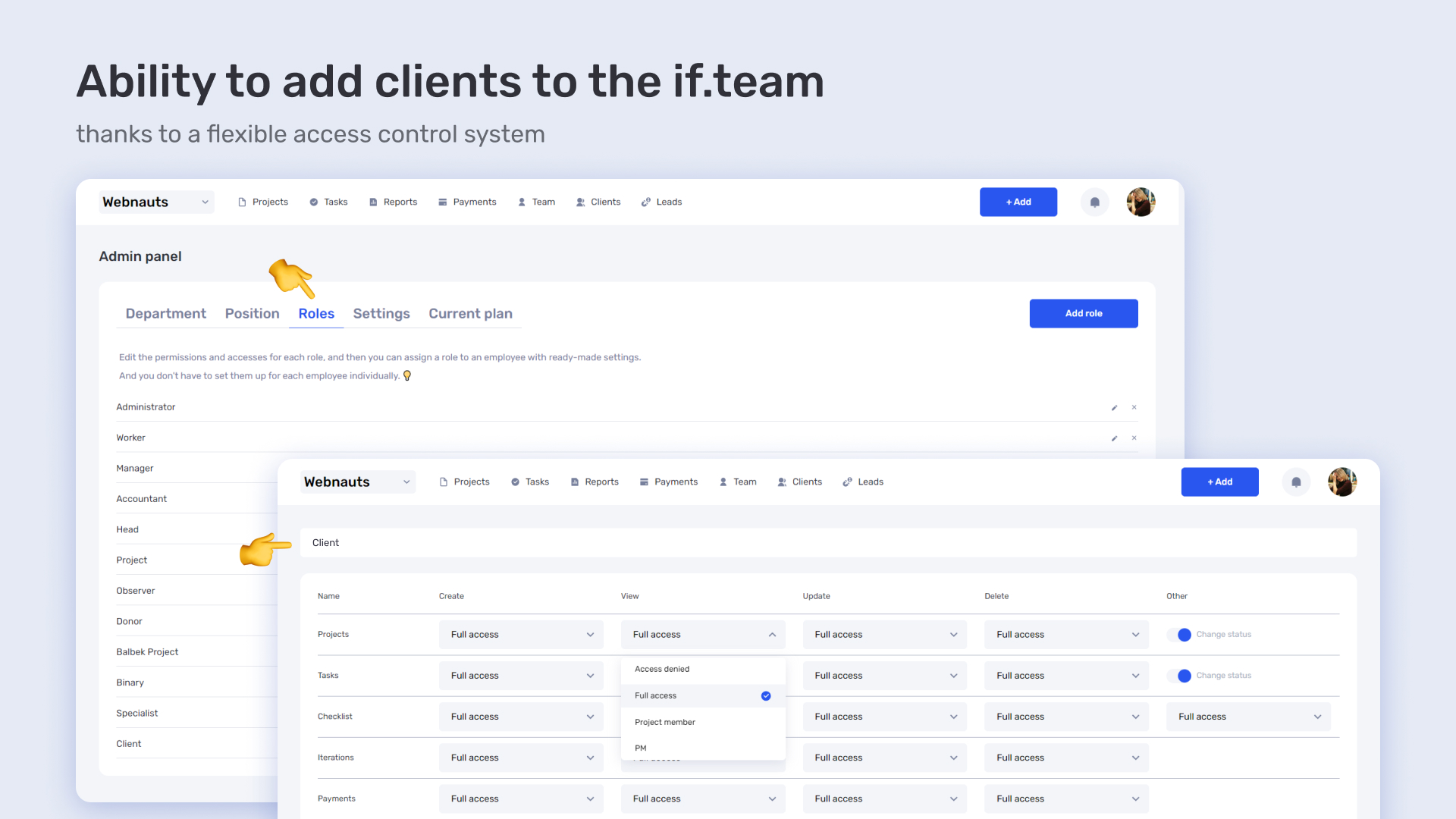
This feature is also popular among CGI studios like GENENSE, which focus on architectural 3D visualizations, where every detail must be agreed upon with the client. With if.team’s PSA platform, designers could easily share progress — no need for third-party services.
Implementing a professional services automation platform completely transformed the company’s workflow. Previously, the team lost time switching between tools. Now, all processes — from task planning to financial calculations — are managed in one system. This improved communication, reduced errors, and freed up resources for creative work.
For Play Fusion Labs, the PSA solution became a way to bring structure to their business without extra spending. One platform instead of three, automation instead of duplication, clarity instead of chaos.
YEP! Accelerator is an innovation entrepreneurship ecosystem that supports startups in their early development stages. Since 2016, they have helped over 500 startups. In the early days, the if.team was also part of YEP!’s acceleration program, and now we are their technical partner.
One of YEP! Accelerator’s first requests were to automate the preparation of financial reporting. Before implementing the PSA platform, the team prepared reports manually — which took a lot of time and increased the risk of errors. Data was gathered from various sources, transactions were verified manually, and summaries were created in Google Sheets.
The benefits of Professional Service Automation in this case were reducing human error, speeding up report preparation, and increasing trust from partners.
Another key task was transparent management of budgets for grant projects. Previously, the YEP! team manually tracked cash balances for each budget and prepared expense forecasts. This complicated adapting to changing conditions of donor funding.
With the help of the PSA platform, we implemented automatic expense accounting and integration with bank accounts. The system displays cash balances in real time, allows planning future expenses, and quickly adapting financial strategies to changes.
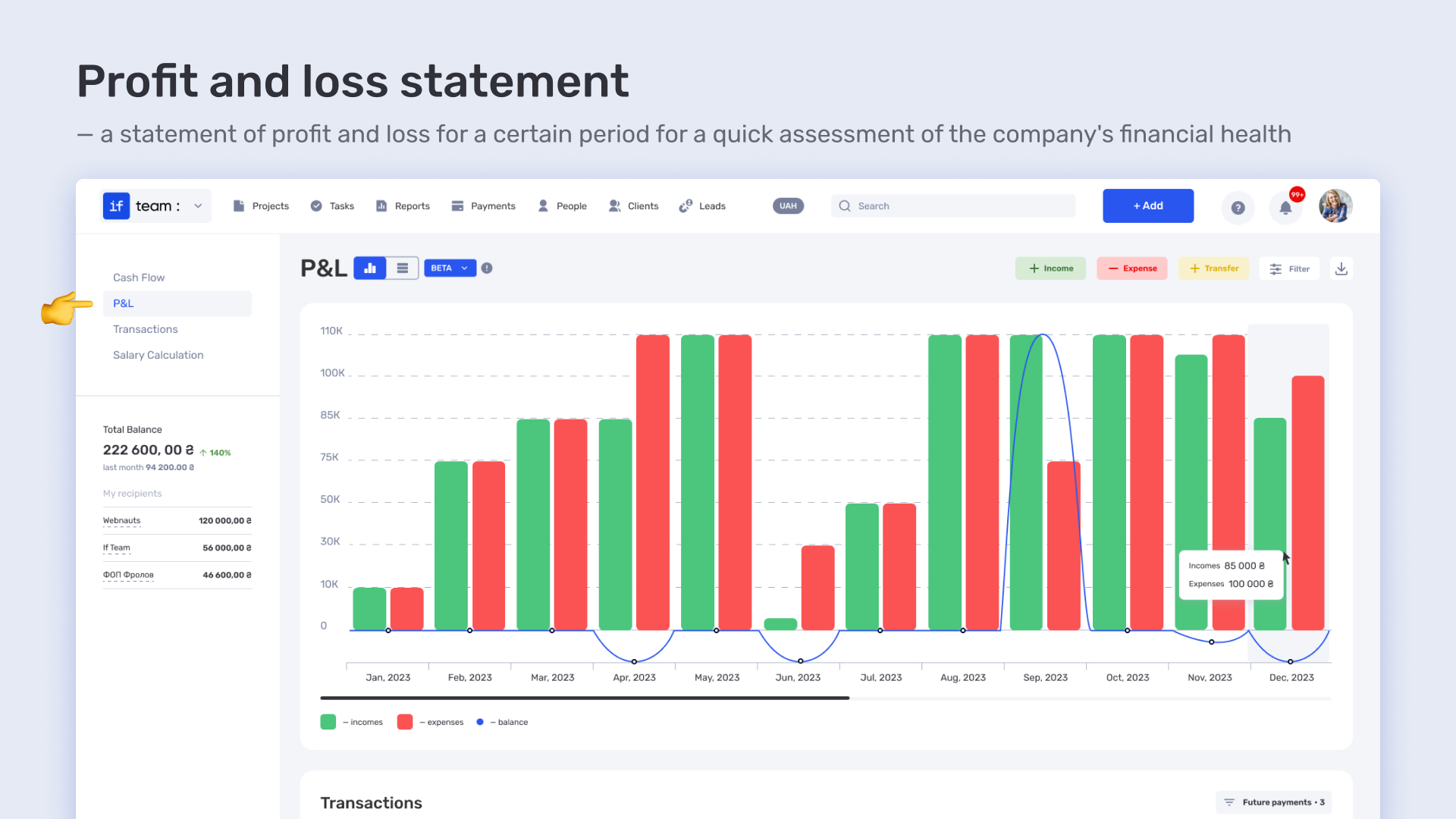
This significantly reduced administrative workload. The benefits of Professional Services Automation here are speed, accuracy, and availability of up-to-date financial data without the need for additional inquiries.
To increase team efficiency, YEP! was looking for a way to centrally coordinate tasks and roles. Before, they used spreadsheets, chat, and email — which complicated deadline control and accountability transparency.
With the implementation of the Professional Services Automation system, each employee received their own area of responsibility: clear tasks, deadlines, and tools for tracking progress. Management can see task statuses across projects, while teams avoid duplicated work.
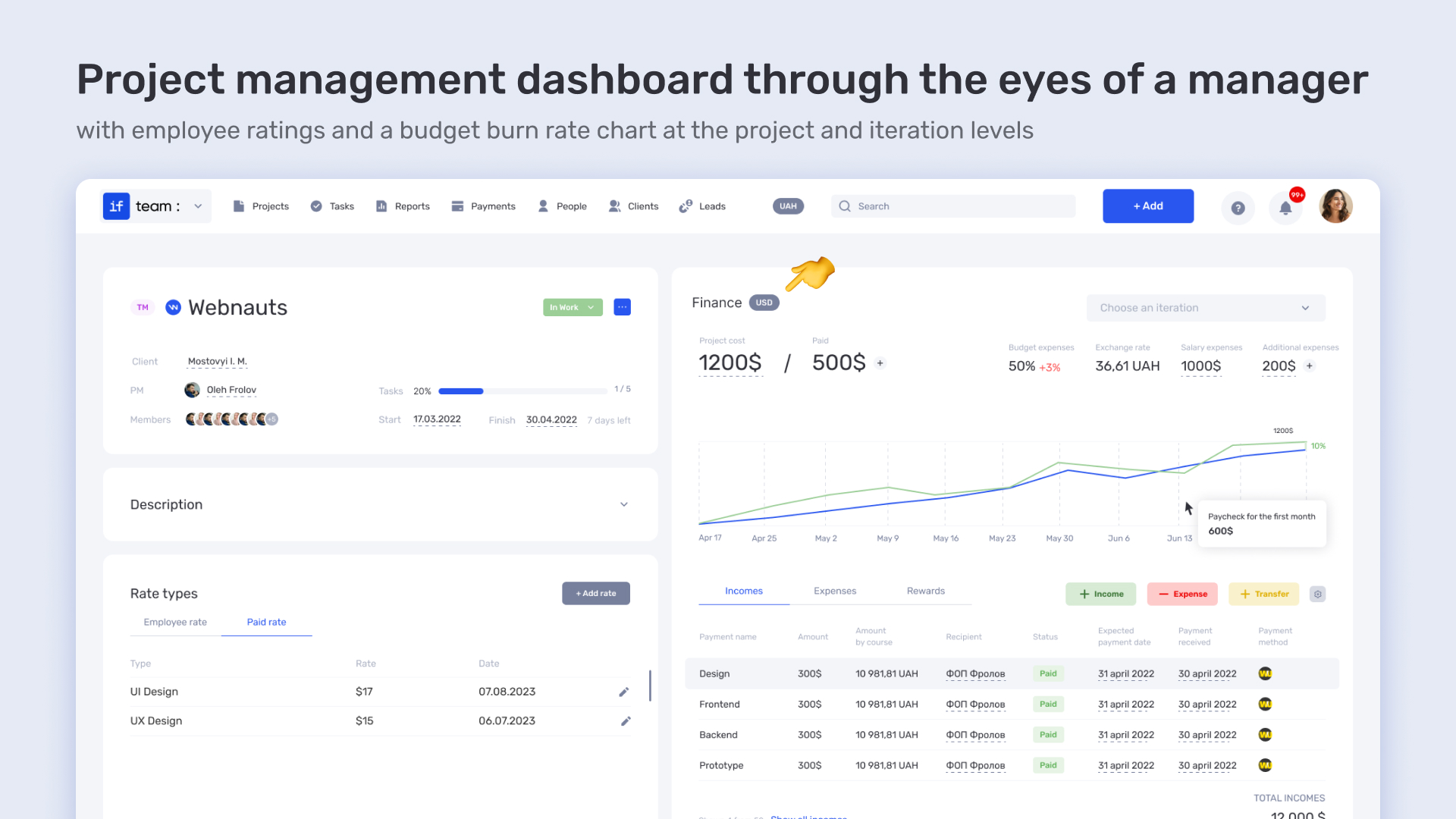
The PSA platform allowed YEP! to synchronize the work of mentors, coordinators, and financial managers within one system. The benefits of Professional Services Automation include stable planning, predictable results, and minimal chaos.
One of YEP!’s key requests was reducing repetitive manual actions. We implemented a series of integrations — with the bank, project application forms, and financial templates. This helped eliminate up to 80% of operational routine, which previously required dedicated staff.
Thanks to the PSA software, all data enters the system automatically: transactions, funding requests, reports. This allows the team to focus on project development instead of technical details.
This is yet another example of how a PSA platform strengthens scaling without adding extra resources. And again, the benefits of Professional Services Automation are clearly visible — time savings, accuracy, and cost reduction.
Automate services — work smarter
Join if.team and free up resources for real growth in 2025
Modern platforms for Professional Services Automation (PSA software) should provide a comprehensive set of tools for managing company business processes in real time. They combine various functionalities that help effectively plan, execute, and control projects. It is important that the system is not only universal but also adaptable to the specifics of each business.
The main advantages of Professional Services Automation include centralized resource management, easier cost control, and transparency at every stage of the project. Additionally, PSA software offers integrated monitoring and analytics tools, which improve real-time decision-making.
In this section, we will review the core functions a modern PSA platform should have and how they contribute to improving team efficiency, resource management, and achieving goals.
Effective planning is one of the main advantages of Professional Services Automation. It directly impacts project success and enables achieving high results. PSA platforms allow managing project plans in real time, automatically updating all stages according to project changes. This ensures maximum transparency and control — key advantages of Professional Services Automation.
A major advantage of Professional Services Automation is the ability to clearly set deadlines for every project stage. PSA software lets you create detailed schedules displaying all key milestones, deadlines, and task dependencies.
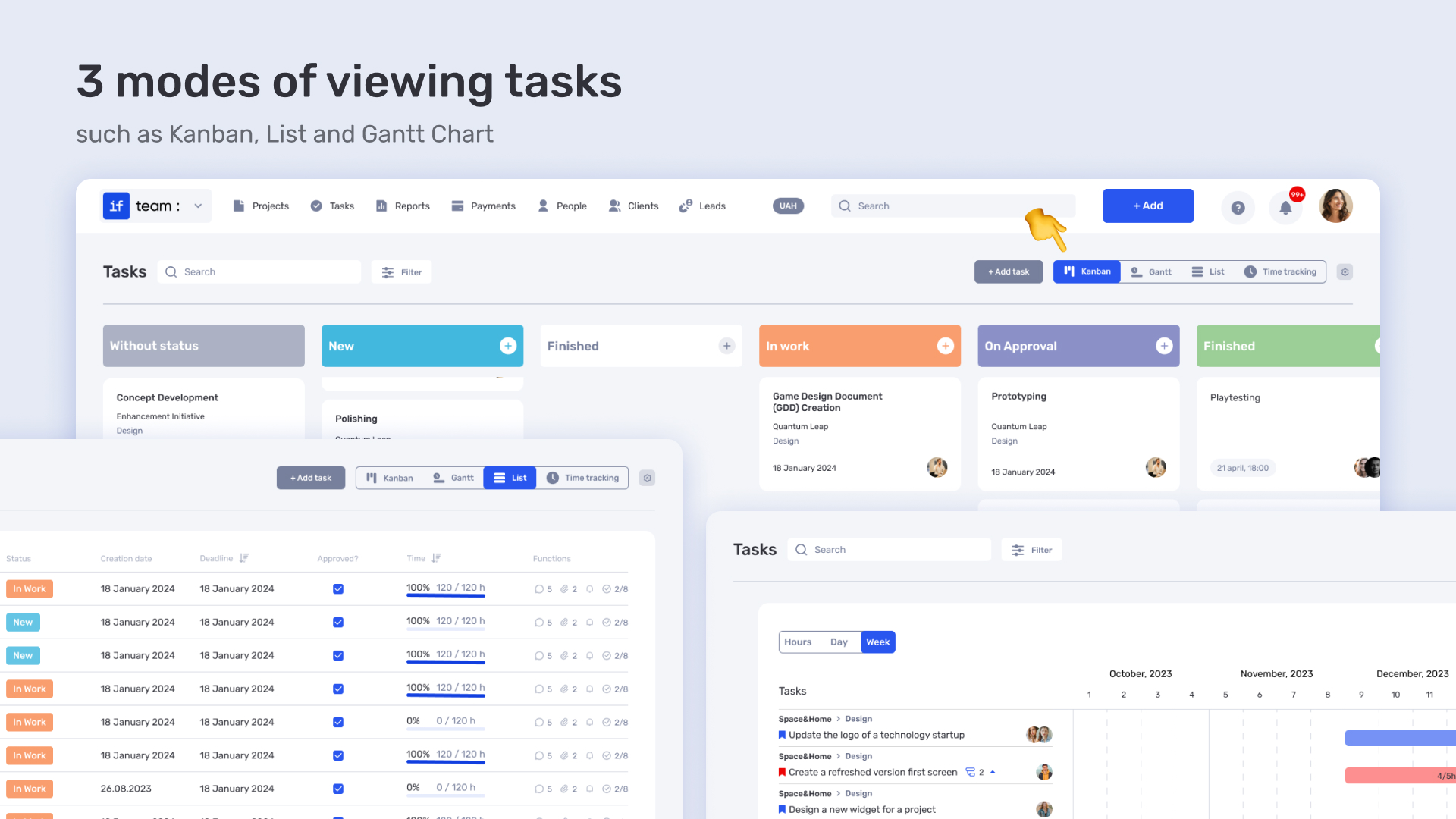
This helps provide transparency in planning and task execution control. Importantly, the system automatically updates deadlines if delays occur, allowing plan adjustments without wasting time.
Managing task dependencies is a crucial aspect of planning. PSA platforms visualize these dependencies — one of the primary advantages of Professional Services Automation. Every task dependent on another is clearly marked, enabling you to see how delays in one stage can affect the entire project structure.
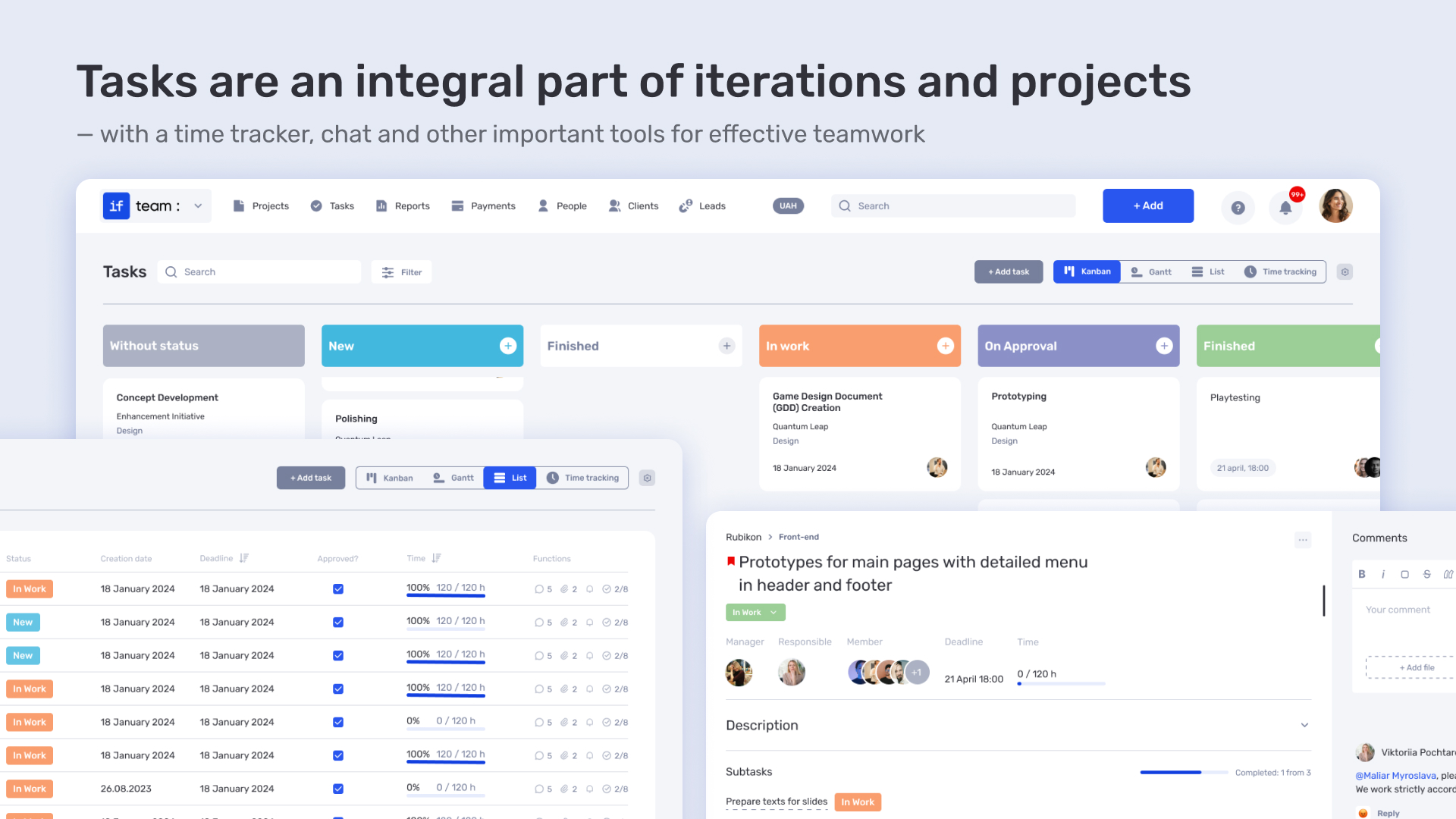
Such insight allows quick plan corrections, ensuring flexibility and maximum efficiency.
Efficient resource management is a key aspect of any platform for Professional Services Automation. PSA software optimizes the use of human and material resources, enabling convenient task organization, workload control, and meeting client requirements. Within a PSA platform, planning and task distribution processes can be automated, significantly reducing time spent on routine operations and providing greater transparency in teamwork.
One important advantage of Professional Services Automation is the ability to quickly and effectively allocate the team across new projects. In the PSA system, each project member gets access to all necessary information in real time, eliminating time lost searching for data and speeding up onboarding. Thanks to a simple platform interface, team adaptation takes minimal time.
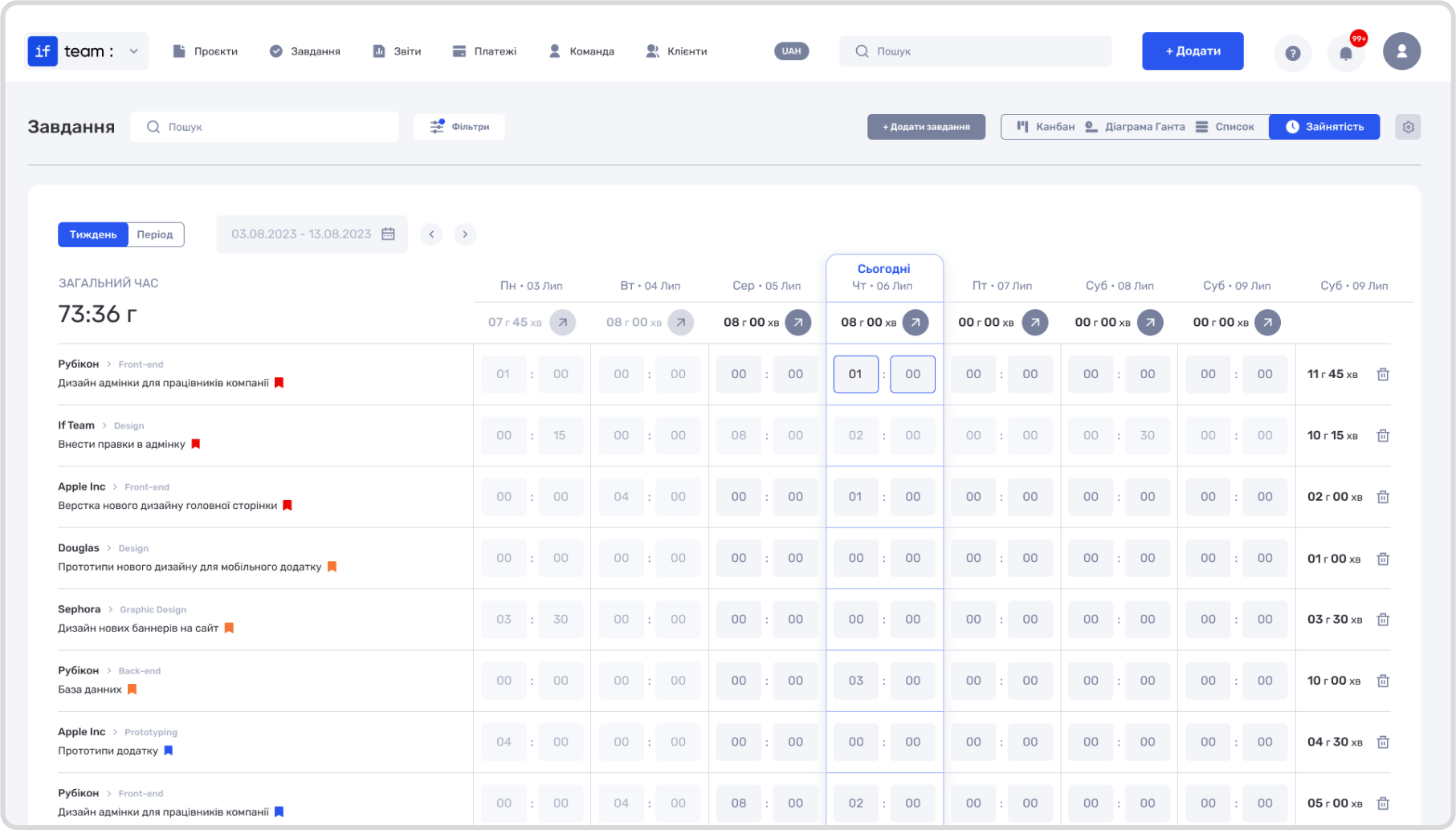
PSA software allows assigning tasks based on priorities, deadlines, and employee qualifications, ensuring efficient team organization. This enables all project participants to focus on their responsibilities without distractions from organizational issues.
Another important feature of PSA platforms is the ability to precisely and swiftly assign specialists according to their skills. The Professional Services Automation system allows creating detailed employee profiles that include not only basic skills but also experience, interests, and other factors influencing the choice of executor for a specific task.
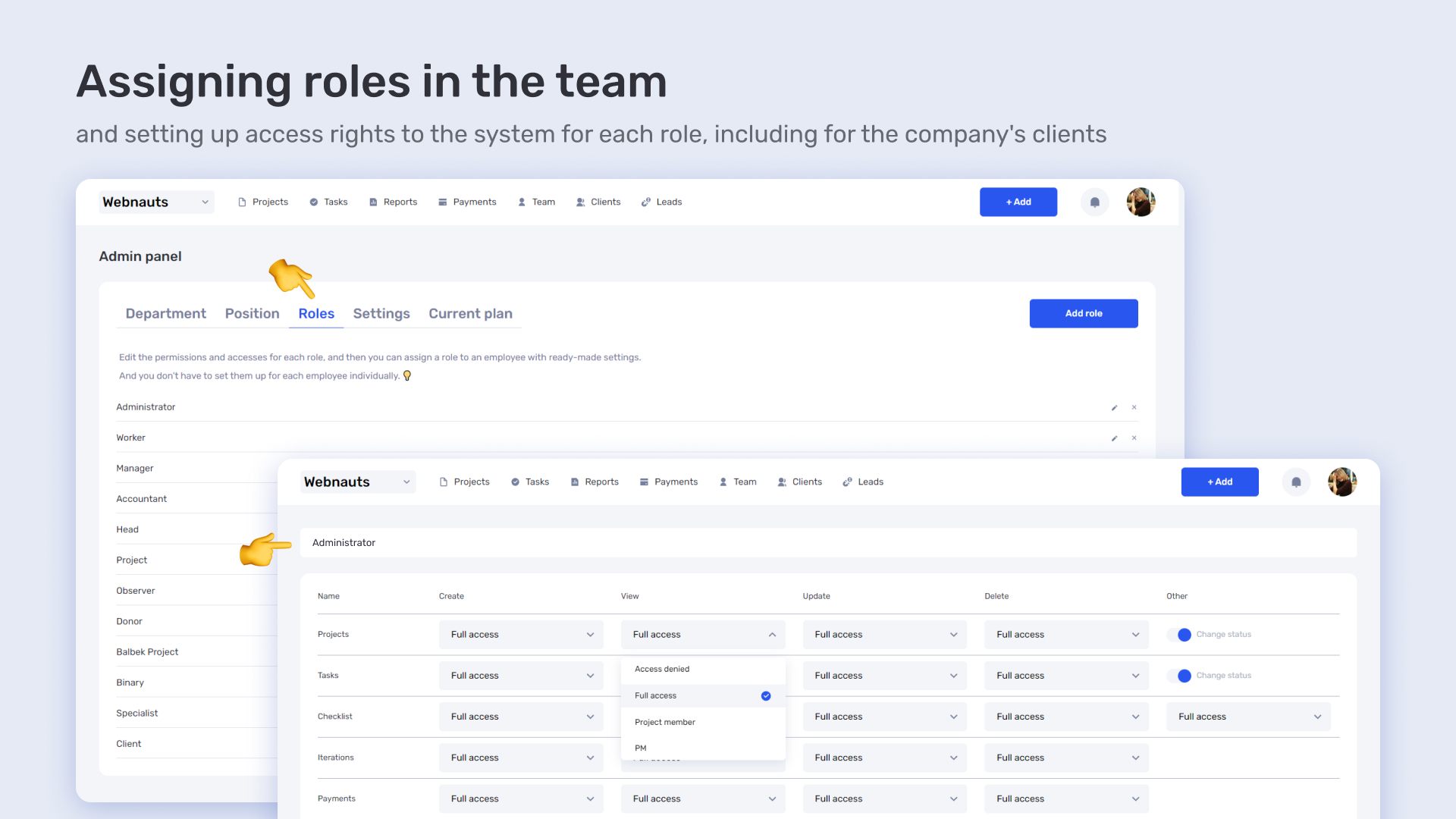
Thanks to this allocation, PSA software lets you promptly appoint the best specialists to relevant tasks, boosting productivity and improving project quality. This reduces the risk of overloading individual employees and ensures balanced workload across the team, positively impacting results and client satisfaction.
A modern platform for Professional Services Automation should not only simplify project management but also ensure transparency, predictability, and control over all business processes. One advantage of Professional Services Automation is having flexible tools that adapt the system to specific team or business needs — from time management to tracking expenses and revenues. A quality PSA software must integrate with the team’s everyday tools, easing planning, communication, and reporting.
For teams working in highly dynamic industries like creative fields, scheduling accuracy is fundamental for efficiency. A PSA platform should offer not just a classic Gantt chart but also support for hourly planning, which is critical for production teams where every minute counts.
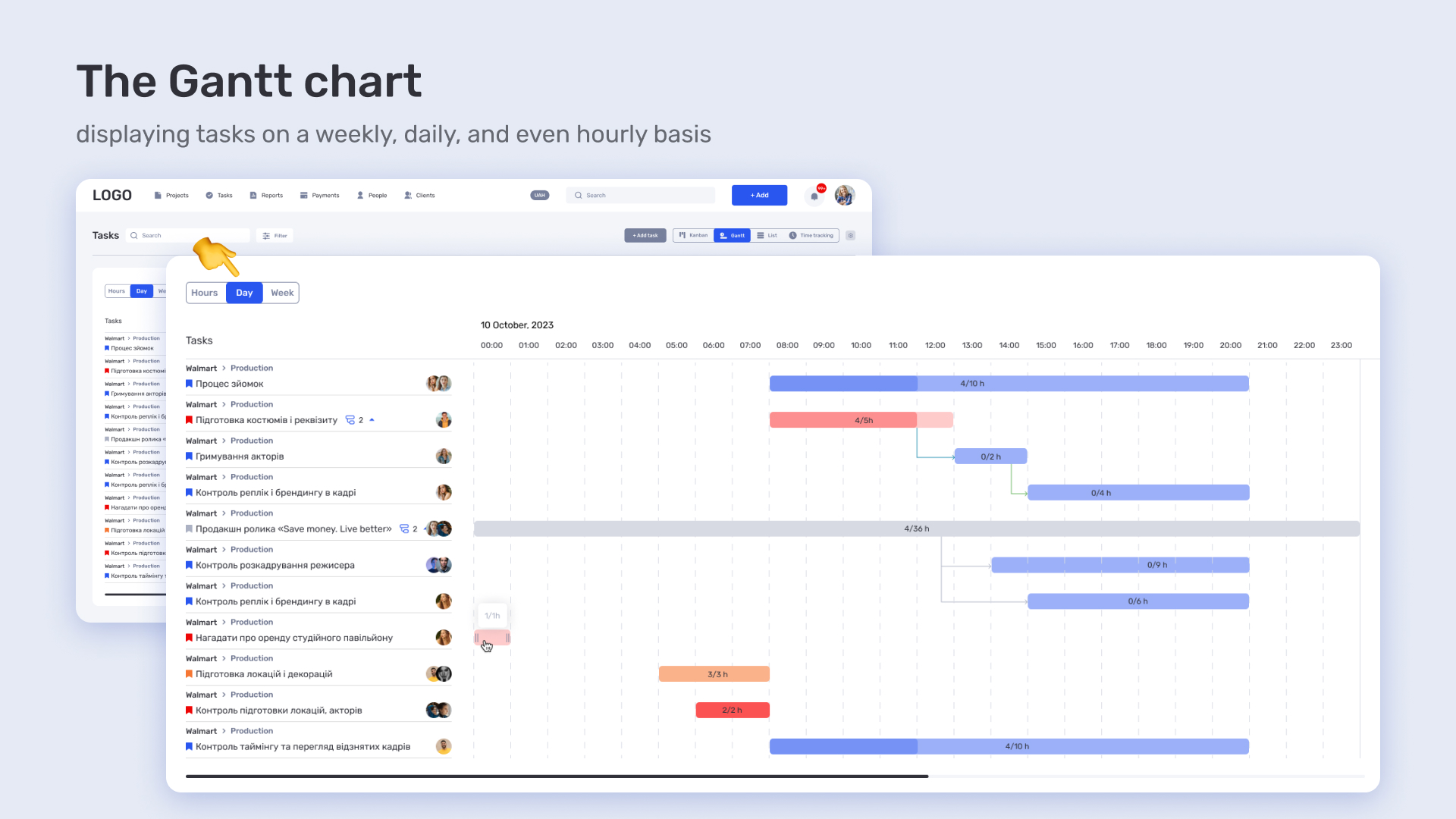
Such PSA software enables coordinating the actions of all participants — from managers to operators and editors — in real time, considering the smallest changes. This helps avoid overlaps, reduce costs, and ensure timely project delivery, directly affecting business profitability.
Another key advantage of a PSA platform is integration with popular tools already used by the team. For example, synchronization with Google Calendar allows viewing PSA system tasks within the familiar calendar interface — personal or team-wide.
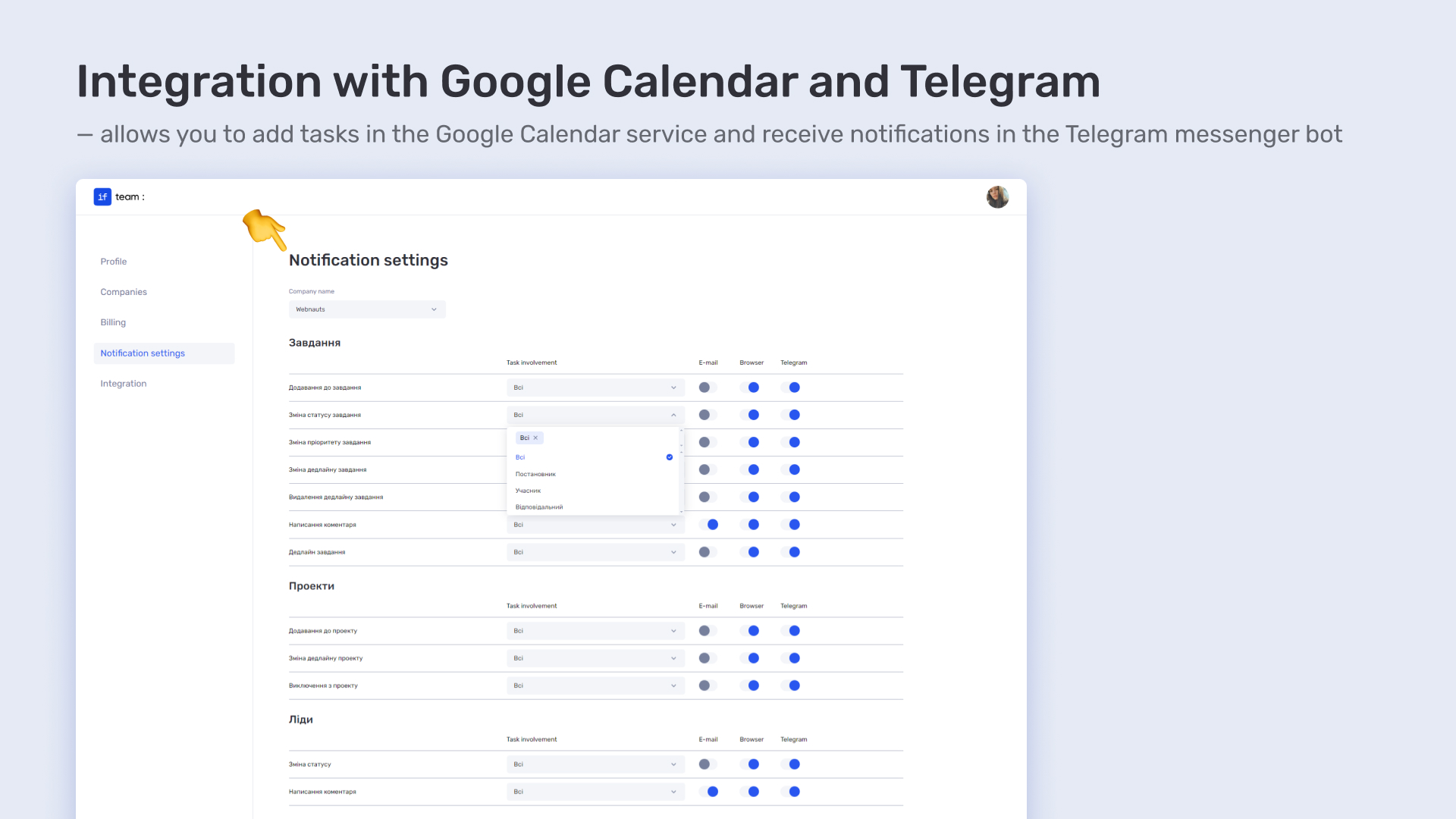
Additionally, integration with Telegram via an official bot provides instant notifications about task or project changes. This is crucial for fast-paced teams that cannot afford to manually check the system constantly. This solution makes the Professional Services Automation system more accessible, convenient, and adaptable to the real work environment.
A platform for professional services automation must be universal—flexible enough to fit the specifics of each industry while remaining stable in managing core processes. Whether it’s an IT company, consulting agency, or marketing studio, PSA software should help teams focus on their expertise rather than routine tasks.
Let’s explore the advantages of professional services automation for different industries.
In IT, fast project pace, complex task structures, and flexible teams require tools that ensure precise planning, transparency, and smooth coordination. That’s why professional services automation is critical for tech businesses. Implementing PSA software allows tracking developer productivity, managing workloads, and timely adapting plans according to team or project changes.
A PSA platform provides a built-in time tracker that records work hours for each task. This enables:
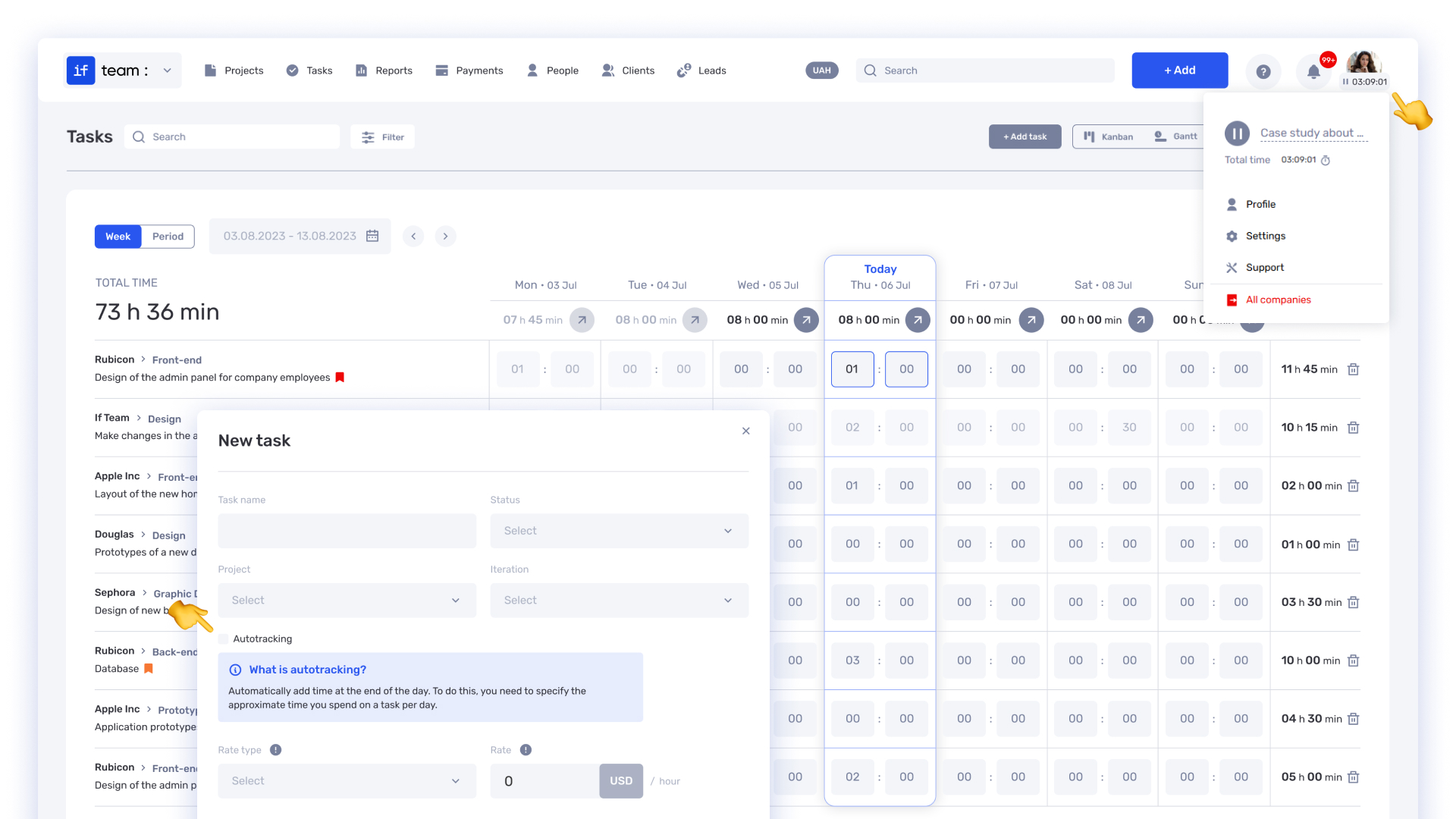
The time tracker is accessible in the user profile and supports manual time entries with a full history. This allows managers to monitor progress quickly, make data-driven decisions, and reduce the risk of missed deadlines.
To avoid overload or downtime, a professional services automation system offers multiple task view modes, including a “Workload” mode. This allows you to:
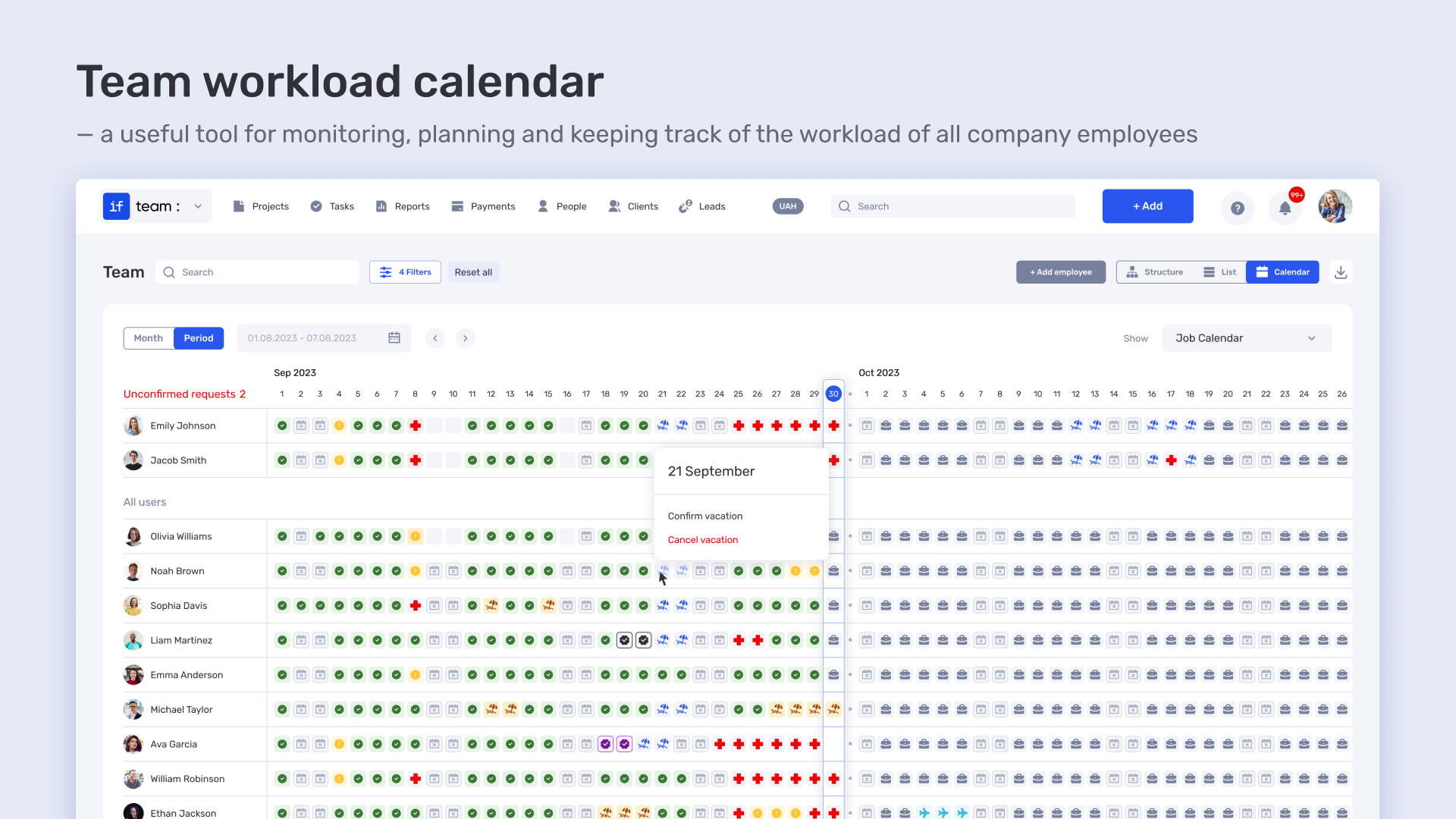
A workload calendar is especially useful—it accounts for work schedules, vacations, business trips, and holidays. This reduces administrative burdens and enables accurate resource planning based on workload forecasts.
Consulting firms operate in a dynamic environment where every minute counts. In this context, professional services automation is not just a trend but a competitive advantage. A PSA platform helps structure workflows, reduce routine tasks, and increase transparency in client interactions.
The benefits of PSA software for consulting businesses are obvious: data centralization, automatic planning, performance control, billing—all within a single interface. Modern professional services automation systems like if.team enable teams to work in coordination and focus on what matters most—the quality of consultations and client business growth.
One of the main advantages of a PSA platform is the ability to structure tasks and create a full task hierarchy: tasks → subtasks → dependencies. This approach allows you to:
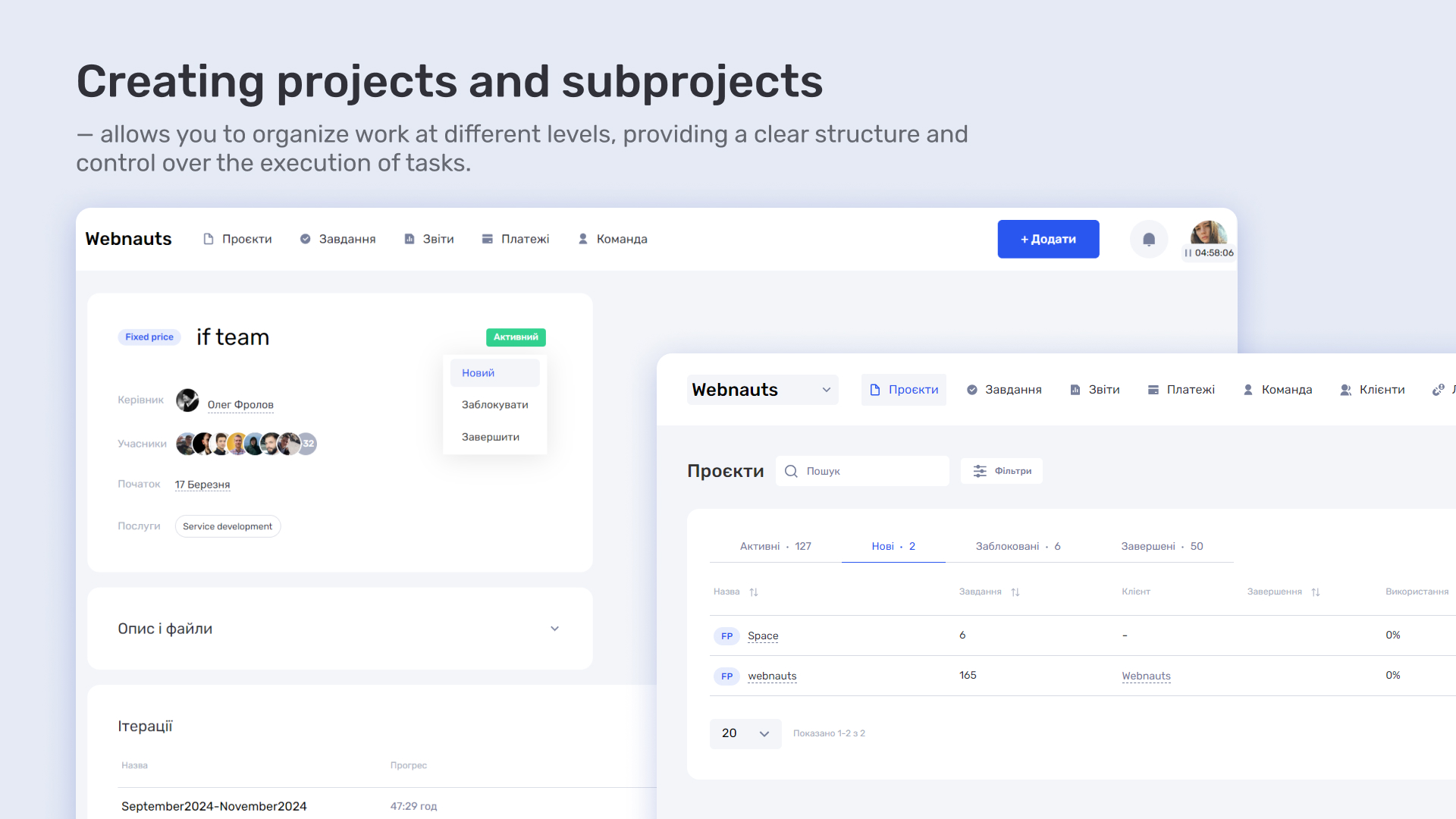
This significantly simplifies project management in consulting—from planning to control. Additionally, automatic status updates keep full transparency for clients and help quickly identify critical execution points.
Another key advantage of professional services automation is financial accuracy. The if.team PSA system supports various rate types: hourly, fixed, special rates for specific projects or tasks. This allows you to:
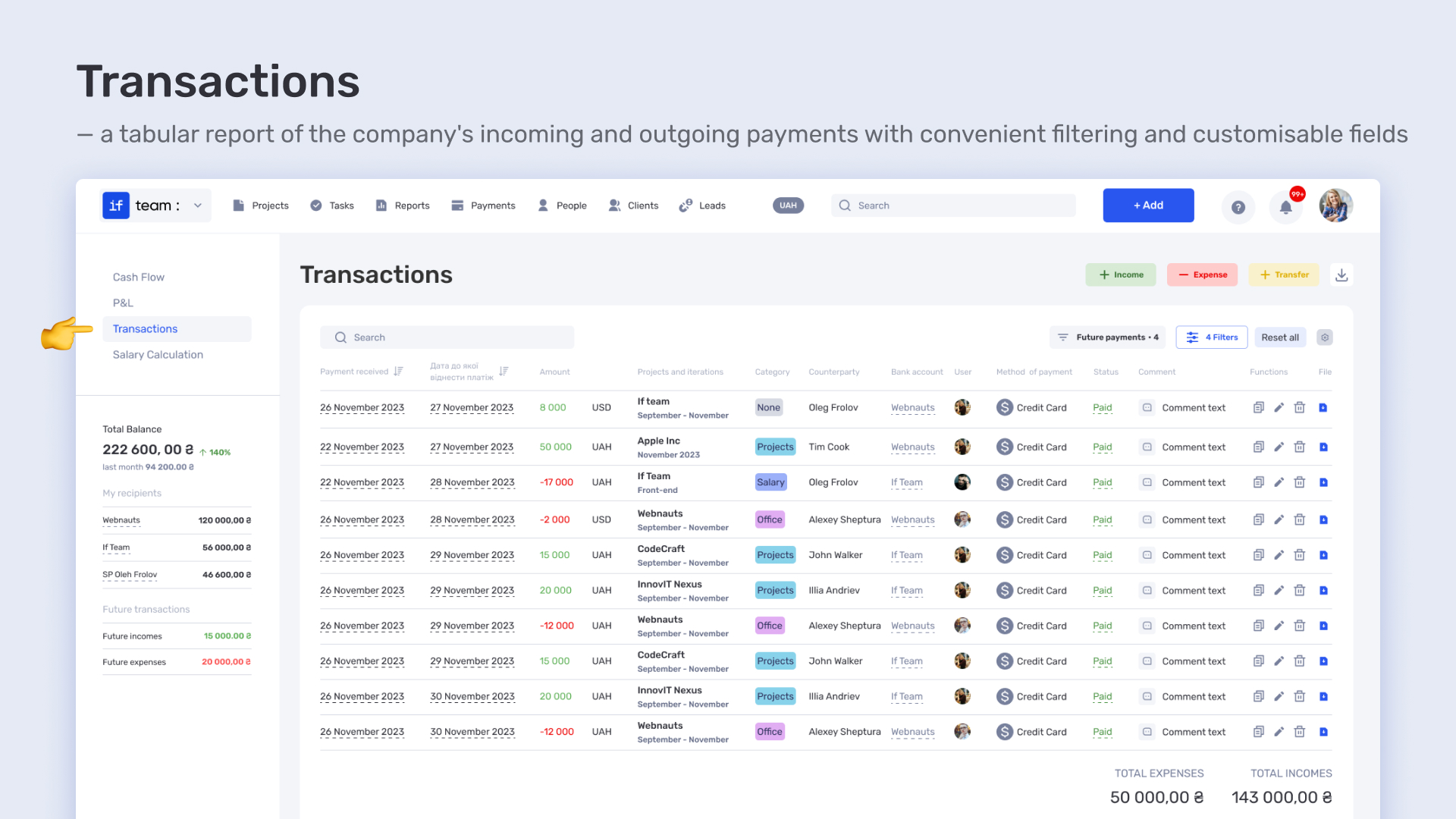
The platform’s financial module provides detailed reports per employee and project, enabling cost control, profitability assessment, and client reporting. This is yet another reason to implement PSA software for consulting agencies.
Marketing teams often work iteratively, with many changes and client approvals. Therefore, professional services automation is not just a convenience here but a necessity for consistent results. Modern PSA platforms like if.team allow efficient project organization while maintaining control over budget, tasks, and communication in one environment.
The advantages of PSA for marketing teams include the ability to quickly adapt to changes, precisely plan workloads, and minimize errors during information transfer between performers.
In if.team, iterations are logical phases or subprojects within which the team completes specific sets of tasks. Iterations help:
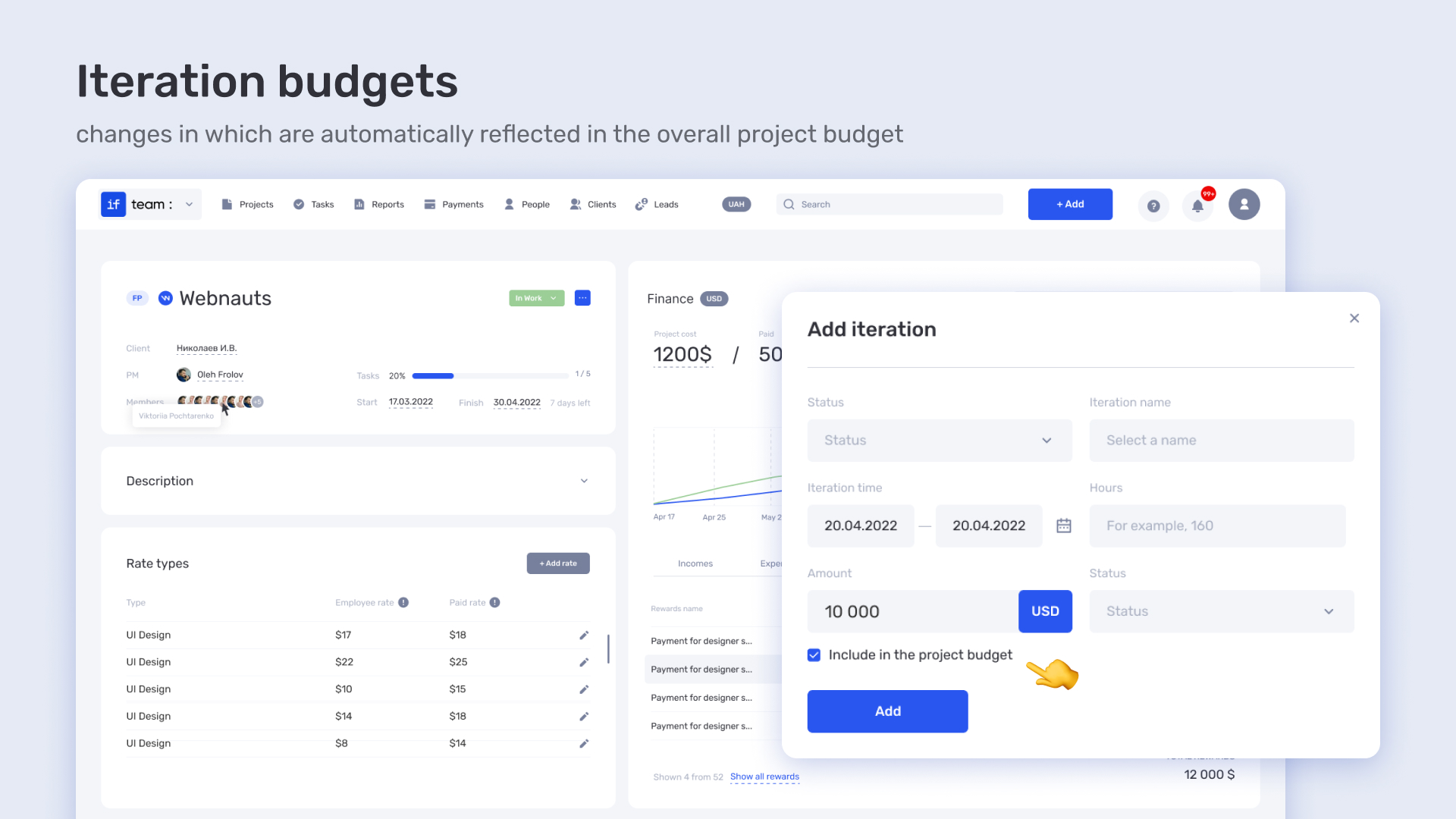
This is especially useful for fixed-price projects where clients gradually add new requirements. A new iteration automatically updates the budget, ensuring transparency and accuracy in calculations. For teams working step-by-step, this is a key advantage of professional services automation.
Effective communication is crucial for marketing agencies, especially in outsourcing or outstaffing scenarios. That’s why if.team’s PSA solution features a full-fledged internal chat system:
Centralizing all communication within one professional services automation platform eliminates the need for external tools, reduces misunderstandings, and improves team cohesion. The chat supports file sharing, reactions, an intuitive interface, and customizable chat panels—everything designed for flexible team collaboration.
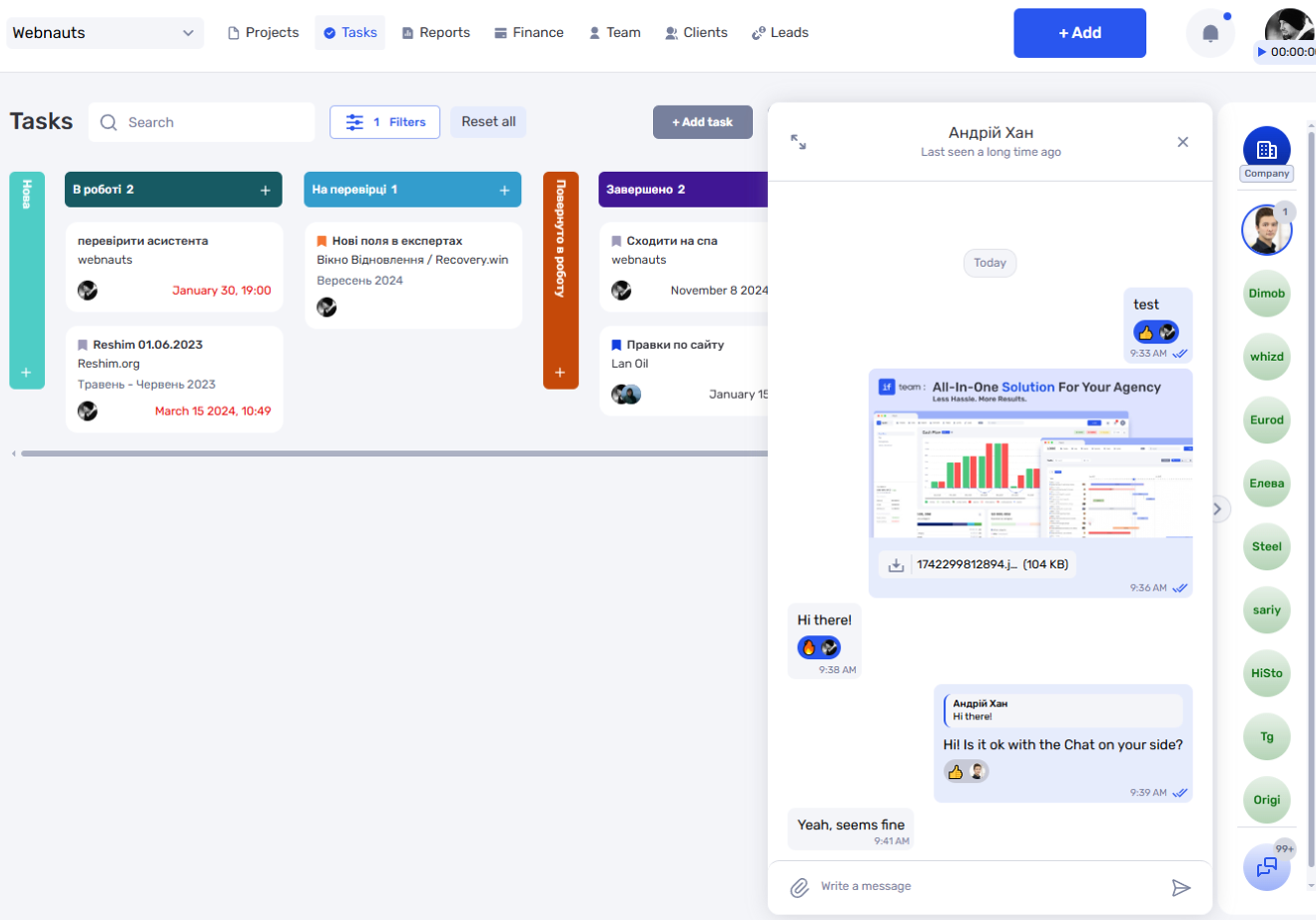
The PSA system also allows setting chat access permissions, restricting or enabling actions for specific roles. This lets marketing teams ensure secure and controlled interactions, even when external clients participate.
More results — less manual work
Launch automation with if.team and focus on what really matters.
If you want, I can help make it even punchier or adapt it for specific uses.
Professional Services Automation is not just a trend but a necessity for businesses aiming to manage projects efficiently, reduce time expenses, and increase productivity. PSA software enables transparency in work, optimizes communication, and controls budgets. Implementing automation into workflows should be gradual, but this step ensures significant progress in the long term.
if.team allows users to start simply and gradually scale platform capabilities depending on business needs. Below is a step-by-step guide for an effective start.
Implementing a PSA platform can significantly improve your business efficiency by automating many workflows. However, to successfully implement this professional services automation system, several key steps must be followed. From the first stage — registration and creating a project or team — to the final stage, where you analyze results and optimize workflows, it is crucial to allocate resources wisely and build a clear structure.
Implementing a PSA platform is an investment in your team’s future, helping to save time, reduce errors, and enhance overall productivity. In this section, we will cover the main steps to start using PSA software, which will help you better navigate the process and realize the benefits of professional services automation in practice.
Start by registering and creating your first project or team on the PSA platform. This will allow you to begin professional services automation by structuring your processes, which is a major advantage. Then add participants, assign roles, and define the budget if the project is already active.
Thanks to PSA software, you can simplify project organization and management, enjoying all the benefits of professional services automation. At this stage, it is also important to identify which PSA platform features will be most useful for your team. This will help efficiently organize workflows and boost productivity.
Next, create projects in the system that correspond to directions, clients, or individual tasks. This will systematize processes and avoid chaos. A PSA platform allows clear task separation by creating categories such as “Ongoing,” “Waiting for Feedback,” and “In Progress.” This greatly improves your team’s work organization. Thanks to the advantages of professional services automation, you can optimize processes and reduce time spent on project management.
Using PSA software ensures maximum project management efficiency.
When facing large tasks, it’s useful to break them into smaller stages. This helps avoid overload and allows better control of task progress.
Thanks to the professional services automation system, you can define clear stages for each task to effectively monitor their completion. For example, a large project can be divided into research, draft creation, review, publication, and report preparation.
Leveraging the advantages of professional services automation, you save time and greatly improve the quality of each task.
Always assign responsible people and set clear deadlines for each task. Using templates for recurring tasks significantly simplifies this process. PSA software allows creating templates for typical actions like preparing publications or onboarding new clients. This enables quick task assignment without writing the action algorithm every time.
Thanks to the PSA platform, you can optimize workflows and reduce error probability, which improves overall productivity.
One main benefit of professional services automation is that it reduces errors and allows you to focus on the more important project aspects.
Templates help save time and increase work efficiency. Every task should have a clearly defined responsible person, deadline, and status reflecting its current state.
PSA software reminds about deadlines, allows quick status changes, and provides a shared calendar for convenient management. This greatly improves workflow efficiency and lets your team focus on important project aspects.
With PSA software, you get a clear picture of processes, which brings the full benefits of professional services automation.
An important part of the process is evaluating work results. PSA software’s analytical tools let you see the overall team and individual performance. This helps identify weak spots needing improvement and gather data to optimize workflows in the future.
The professional services automation system provides detailed reports visually showing progress, time, task statuses, and team efficiency. Thanks to the benefits of PSA, you can better control project progress and understand where improvements are possible.
This allows effective use of resources and work time, boosting overall productivity.
Implementing a PSA platform is an important step towards automation and business transformation. If you want to increase efficiency, improve team communication, and optimize costs, a professional services automation system is a must-have tool.
PSA software from if.team helps organize workflows, improve project and task management, and simplify communication with clients. Using such a PSA platform helps save time, reduce expenses, and significantly increase productivity.
By introducing professional services automation, you improve internal processes, make team work more coordinated, and ensure high-quality client service. PSA software helps you not only maintain competitive advantages but also move to new levels of efficiency.
Don’t waste time — transform your business today with the if.team PSA platform!






Time to Take Your Work to the Next Level
Automation is not a trend but a necessity in 2025.
Join if.team to turn routine tasks into growth starting today.