Published May 13, 2025, in if.team blog

Vladyslav Chesnokov
Copywriter, if.team

Oleh Frolov
CEO, if.team
IT professional services automation refers to specialized solutions designed to manage all aspects of operations within service-based companies. Unlike standard tools such as CRM or ERP, these systems focus specifically on managing projects, resources, time, and finances in the service business. PSA brings together functions that are usually scattered across multiple tools into a single platform.
For businesses, this means control over deadlines, team workload, and invoicing. For small businesses, it brings time savings, streamlined processes, and the ability to scale without chaos.
Professional services automation for small business is especially valuable during the growth stage, when maintaining control over projects and spending is crucial — but there’s no room for unnecessary bureaucracy.
In this article, we’ll cover:
This article is useful for business owners, team leads, and anyone who wants to work more efficiently instead of wasting time and resources on disorganized operational tasks.
When a company operates without PSA, many processes have to be managed manually. This takes up valuable time, creates confusion, and slows down growth. Professional services automation for small business helps avoid these issues early on by streamlining operations and reducing errors. Similarly, the lack of IT professional services automation leads to scattered workflows and missed deadlines in tech-focused teams.
Loss of control over projects
Tasks, deadlines, and dependencies between stages are often stored in separate files, chats, or emails. The team spends time searching for the necessary information, and managers don’t see the full picture. As a result, projects get delayed, and clients remain dissatisfied.
Inefficient use of resources
Without a unified tracking system, it’s hard to assess employees’ workloads. Some team members are overloaded, while others are underutilized. This affects work quality, increases the risk of burnout, and leads to losses.
Mistakes in finances and reporting
Manual invoicing, lack of integration between systems, and complex reporting increase the likelihood of errors. Incorrect invoices, payment delays, and the absence of transparent financial data hinder business growth.
Limited scalability
As the company grows, the volume of work increases. Without process automation, this turns into chaos. There’s a need to hire more and more people just to manage operational tasks. This restricts scalability and increases costs.
Почніть працювати з if.team уже сьогодні та звільніть час для розвитку бізнесу
PSA (Professional Services Automation) is a centralized system that helps service companies manage their operations. It combines all key processes: project planning, task allocation, time tracking, expense management, invoicing, and analytics. This allows managers to see the complete picture — who is doing what, how much time the team spends, where delays occur, the company’s financial results, and much more.
For example, a small IT company with ten employees is working on three client projects. Without PSA, the manager keeps everything in mind and uses multiple Excel files and chats. As a result, they spend hours each week on coordination, task checking, and preparing invoices. With PSA, all the information is collected in one place: the manager can view task statuses, team workload, and financial metrics in real-time.
IT professional services automation in this case helps streamline control, reduce administrative costs, and ensure process stability, even when workload increases.
Another strong point of PSA is the automation of professional services for small businesses. For example, the system automatically generates invoices based on registered work hours or reminds about deadlines. This reduces the team’s workload, minimizes errors, and allows focusing on what truly adds value to the business.
PSA becomes particularly useful as a company grows. What worked in the beginning — such as controlling tasks in a notebook or spreadsheets — becomes inefficient as the number of projects, clients, and employees increases.
PSA is suitable for companies that provide professional services and need clear organization of workflows, effective planning, and resource management. These can include IT companies, consulting firms, marketing agencies, legal and accounting companies, as well as small businesses looking to optimize their operations. Professional services automation for IT in this context ensures transparency in projects, accurate expense tracking, and stability in the work of technical teams.
Professional services automation for small business allows companies to grow by streamlining their operations and providing tools for automating routine tasks, such as time tracking, invoicing, and project management.
This solution is not only for large companies but also for small businesses that have limited resources and strive for greater efficiency. Automating processes helps avoid errors and delays, which are critical for maintaining high customer service levels and staying competitive.
PSA includes several core features that enable effective project and business process management. These include project management, time tracking, resource allocation, financial reporting, invoicing, and analytics.
These capabilities make IT professional services automation and professional services automation for small business essential for streamlining operations and supporting growth.
IT companies often manage multiple projects and clients at the same time. This requires structured organization and constant oversight of tasks, time, and resources. IT professional services automation consolidates all key processes into a single system, significantly improving operational efficiency.
PSA automates many routine tasks—time tracking, project management, invoicing—which reduces manual errors and saves valuable time. Teams can respond to changes more quickly and focus on high-impact work.
Companies that implement IT professional services automation can handle more clients and projects without increasing administrative overhead. This allows them to scale rapidly without hiring additional staff just to manage operational tasks.
PSA also enables real-time access to all critical information. Managers can track task progress, resource usage, and financial performance, allowing them to make faster decisions and drive productivity.
Professional services automation for IT companies ensures smooth operations and reduces the workload on employees. It enables efficient project management, cost control, and optimized resource allocation—crucial factors for a company’s performance. With PSA, IT teams can focus on task execution instead of spending time on routine operations.
One of the key benefits of IT professional services automation is time and resource tracking. PSA tools reduce errors in data collection and reporting. Managers gain accurate insights into task progress without constantly checking in with team members, which simplifies oversight.
PSA also streamlines invoicing. The system can automatically generate invoices based on tracked time and completed work. This minimizes billing mistakes and increases transparency for clients.
By integrating all project stages into one system, IT professional services automation makes it easier to manage operations and analyze performance. As a result, companies can respond to project changes more quickly and improve overall efficiency.
If.team specializes in project management with flexible configuration, allowing IT companies to organize workflows efficiently from planning to delivery. The platform supports both Fixed Price and Time & Material models, making it easy to adapt to a project’s complexity, scale, and budget.
Iterations are key to breaking large projects into manageable phases. Each iteration has its own budget, task list, deadlines, and assigned team members. For example, if a client requests additional functionality, you can quickly add a new iteration, and the system will automatically adjust the final budget. This is especially helpful for teams working iteratively and continuously improving the product.
In this context, IT professional services automation reduces time spent on administrative tasks and boosts operational efficiency.
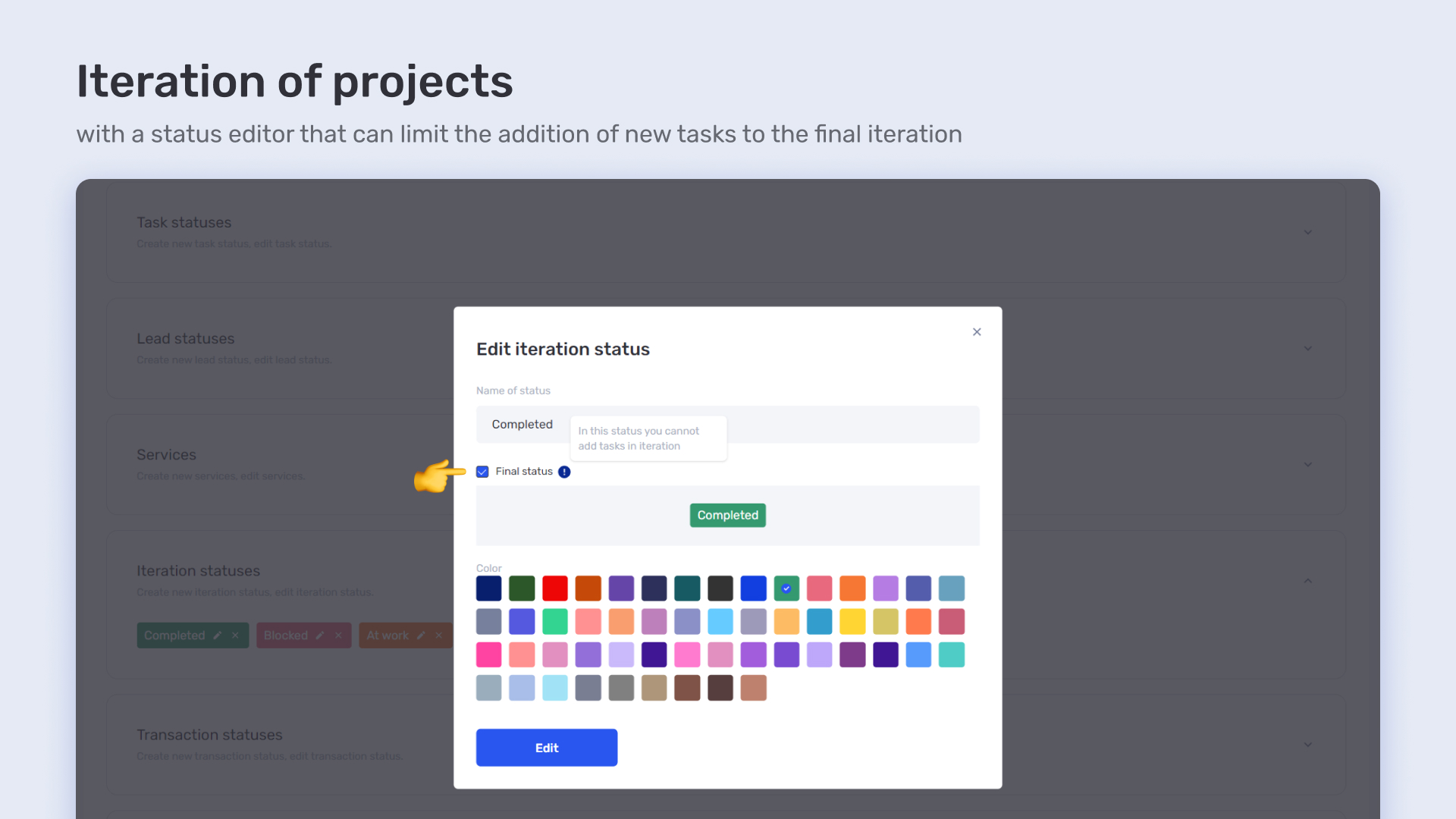
Iterations help structure workflows and make it easier to adapt projects to changing conditions or new client requirements. With this approach, the client always sees a clear breakdown by phase and understands exactly how much time and resources each one requires. IT professional services automation makes it possible to implement changes quickly without significant time loss.
if.team enables users to create individual tasks and build a full hierarchy: task → subtask → dependencies. This allows teams to break down the work in detail, distribute it efficiently, and define a clear execution order — all of which are critical elements in the automation of professional services for IT.
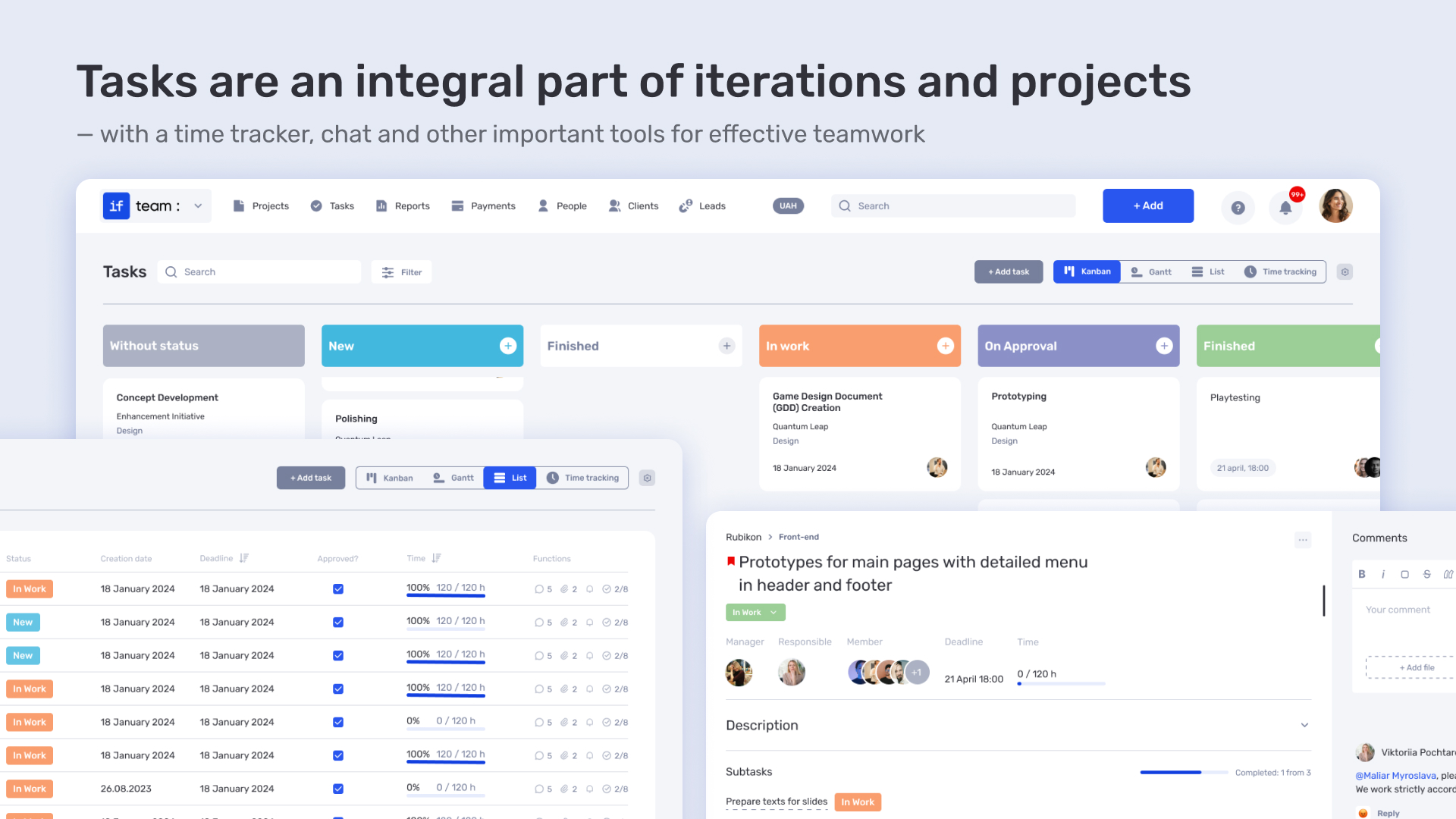
For example, before the final product review, all development and testing subtasks need to be completed. This structure increases process transparency and makes it easy to track progress. The team sees who is responsible for what and can manage task dependencies, greatly simplifying the coordination of large projects. IT professional services automation ensures clear control over each phase, reducing errors and time loss.
Each task and project in if.team comes with a set of statuses — “New,” “In Progress,” “Review,” and “Completed.” Any status change is instantly reflected across all reports and dashboards. Managers and clients can immediately see the current progress without having to gather data manually or send additional requests.
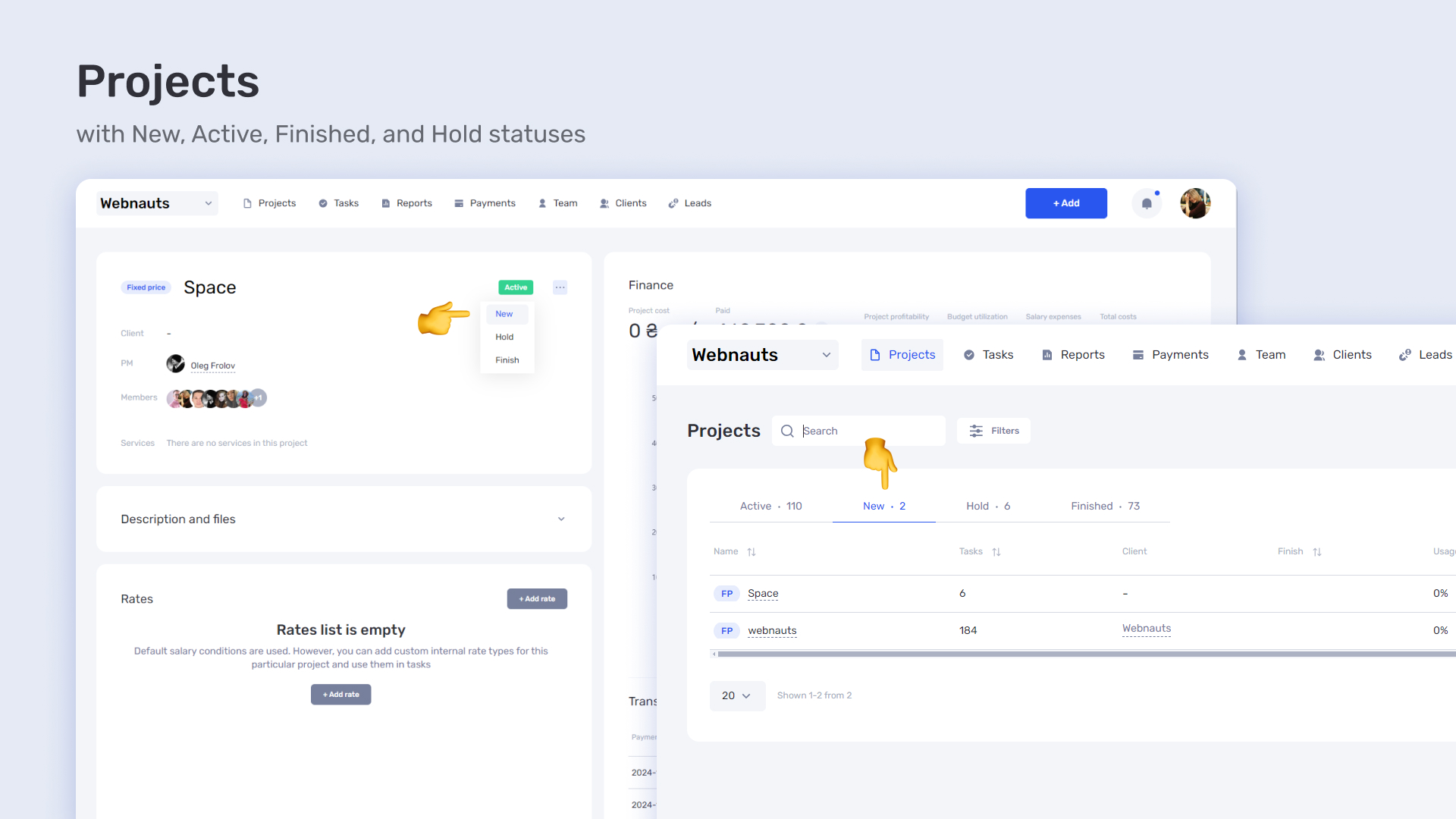
This ensures convenient and transparent communication both within the team and with the client. The client always knows which stage their project is at, while the manager can quickly detect issues or delays and adjust the project flow in real time.
Time and resource tracking is the heart of any effective team management. IT professional services automation provides powerful tools that allow agencies to analyze how much time is spent on specific tasks and projects, which employees are overloaded, and where there are reserves.
Each employee can track their hours in real time or add them manually. This is convenient for companies that do not use live tracking but still want to see the full picture of their expenditures. The tool automatically collects data and generates reports for each task, day, or week, which is an important part of IT professional services automation.
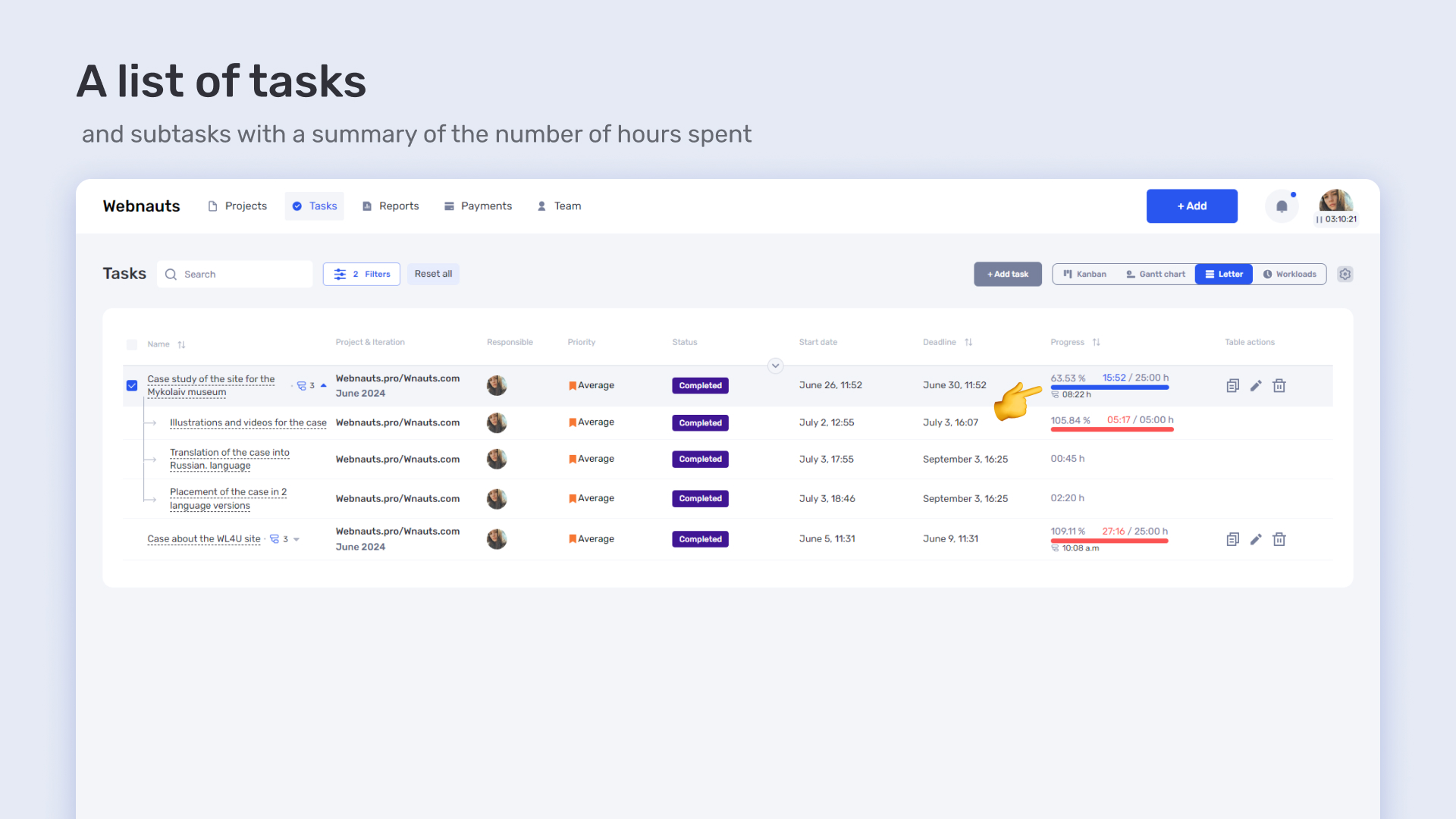
All the hours worked by employees are recorded in one place, which helps to avoid data duplication or omissions. It also allows seeing the overall workload of the team and making decisions about resource redistribution or process optimization.
The manager can see how the team is loaded: who worked how many hours on the project, how much time is left, and where there are overages. This helps in resource planning and prevents burnout.
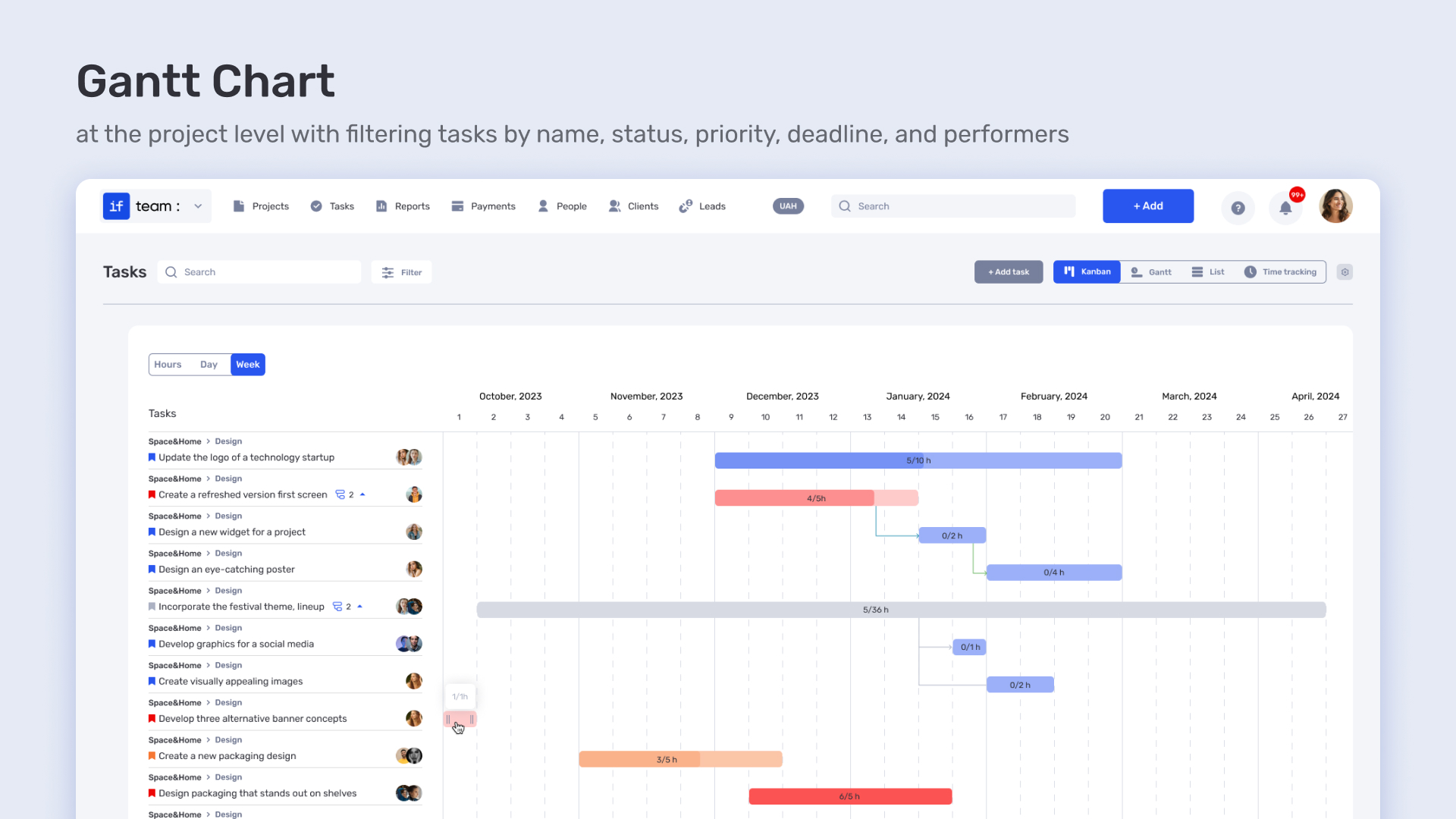
The system also helps identify employees who are falling behind schedule or, conversely, have free time that can be redirected to other tasks. Reviewing occupancy helps make processes more transparent and understandable for each team member.
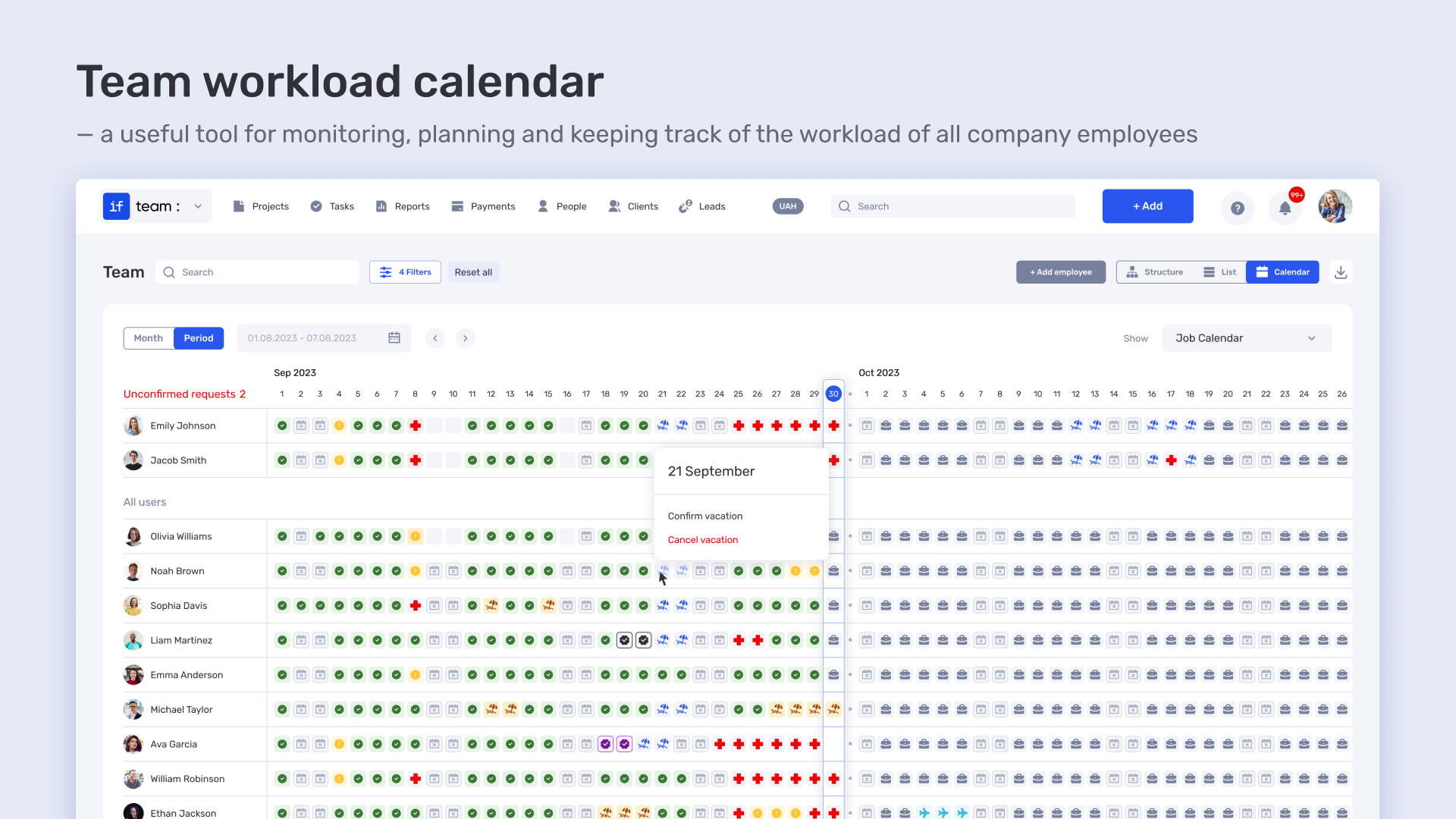
The system creates charts and tables that show where the team is working most efficiently and where delays occur. This helps in identifying bottlenecks and improving workflows. With clear analytical data, the team can adjust its strategy and project settings to achieve the best results. IT professional services automation allows quickly addressing identified issues to prevent them in the future.
Automate processes with if.team and move towards your goals faster
Small businesses often face limitations in both resources and time. However, this doesn’t mean they can’t benefit from automation advantages that were once available only to large companies. Professional services automation for small business helps optimize key processes, from project management to financial accounting. As a result, businesses can not only save time but also reduce the likelihood of errors, increasing efficiency at every stage of their operations.
Professional services automation tools for small businesses enable the automation of processes that previously required manual tasks, such as time and resource tracking, report generation, and invoicing. This allows businesses to focus on growth and development, rather than on routine administrative tasks.
Professional services automation for small business provides access to powerful tools for managing projects, finances, resources, and client relationships. The successful use of such solutions enables businesses, regardless of their size, to increase productivity, reduce costs, and decrease the time spent on management processes. Here’s how PSA can help small businesses:
For small businesses, it is crucial to control who has access to what data. If employees have excessive permissions or, conversely, limitations in their access rights, it can lead to reduced productivity or data security issues. Professional services automation for small business through if.team allows setting access levels to various project elements to ensure security and efficient workflow.
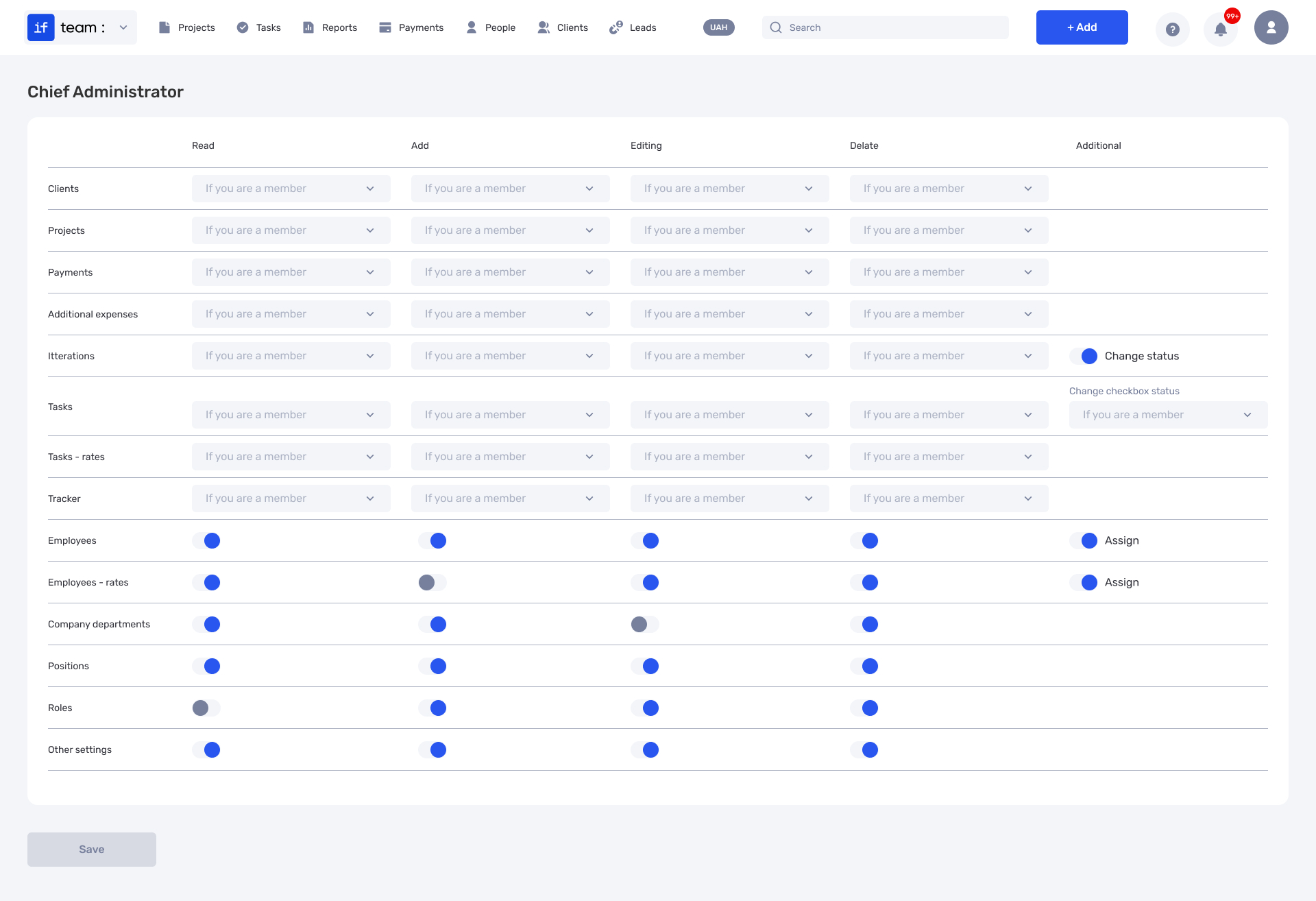
For example, a project manager may have access to financial reports and the budget, while an employee can only view the tasks they are responsible for. This reduces the risk of errors and unauthorized access to sensitive information, helping to maintain efficiency and security at every stage of the work.
For small businesses, expense control is a matter of survival. Professional services automation for small business through a budget burn chart is a crucial tool for monitoring finances in real-time. It allows businesses to see if expenses are exceeding the planned budget and provides the opportunity to adjust resource allocation in a timely manner. With this tool, unexpected expenses can be avoided, and the spending strategy can be adjusted promptly.
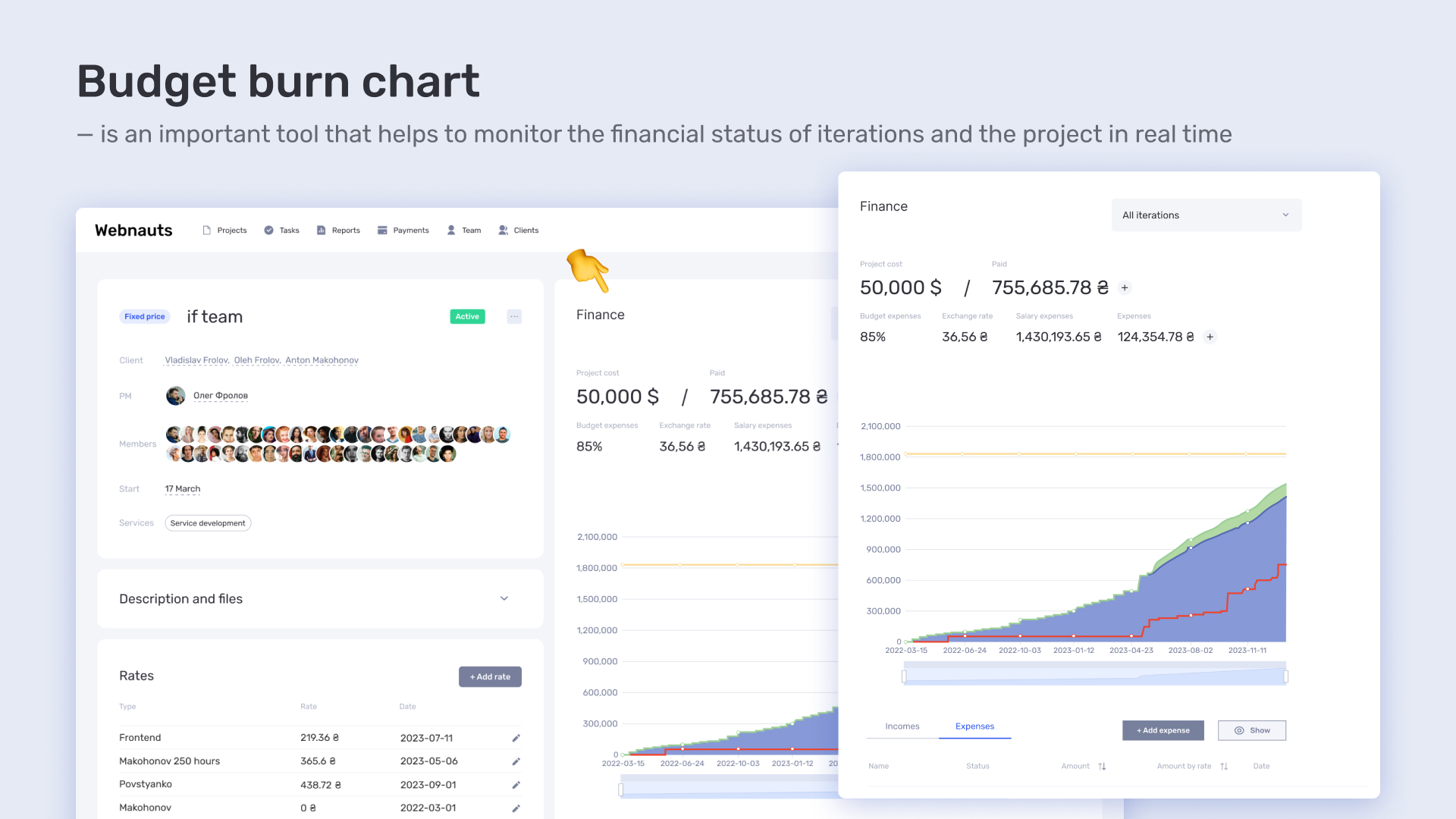
This is especially useful for small businesses, as it allows them to maintain flexibility and control at every stage of the project, particularly when the budget is limited. The burn chart enables quick checks to see if expenses are surpassing the planned limits and allows for corrective decisions to be made on time.
For small businesses, it’s important not just to complete a project but to make a profit from it. The profitability analysis in if.team allows businesses to clearly assess whether the costs of executing a project are justified and whether it’s worth continuing in the same format. This tool helps identify which stages of the project consume the most resources and whether those expenses align with the outcomes achieved.
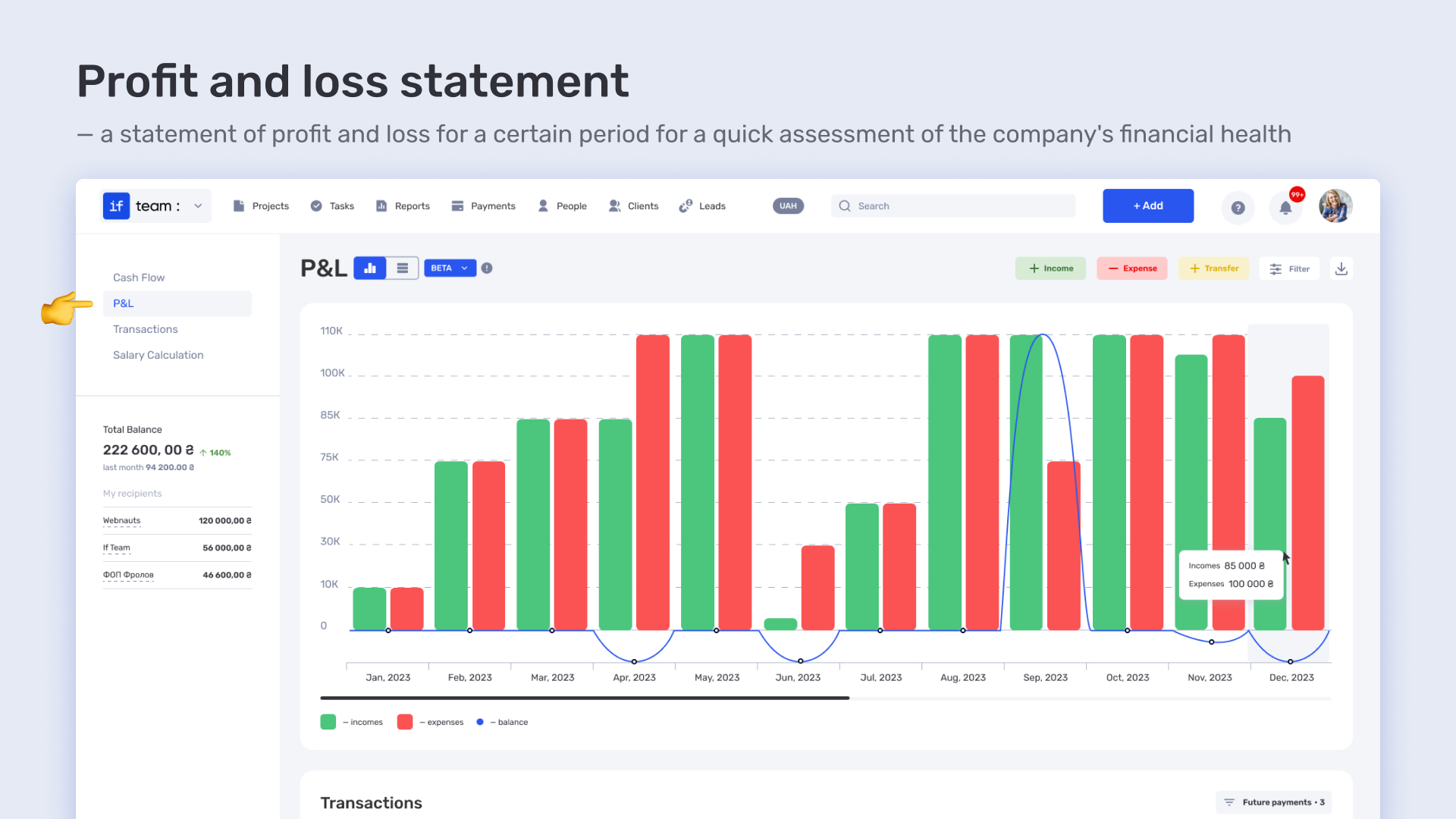
Profitability analysis helps small businesses maintain a balance between costs and revenue, ensuring steady growth. Professional services automation for small business enables managers to make quick decisions about the project’s future, allowing them to adjust the strategy on time and increase profitability.
If a client experiences delays with payments or faces financial issues, it can seriously affect the stability of a small business. With PSA tools, like those in if.team, businesses can track the status of each client’s payment in real time. This not only helps prevent delays but also allows for timely responses to any changes in payment processes.
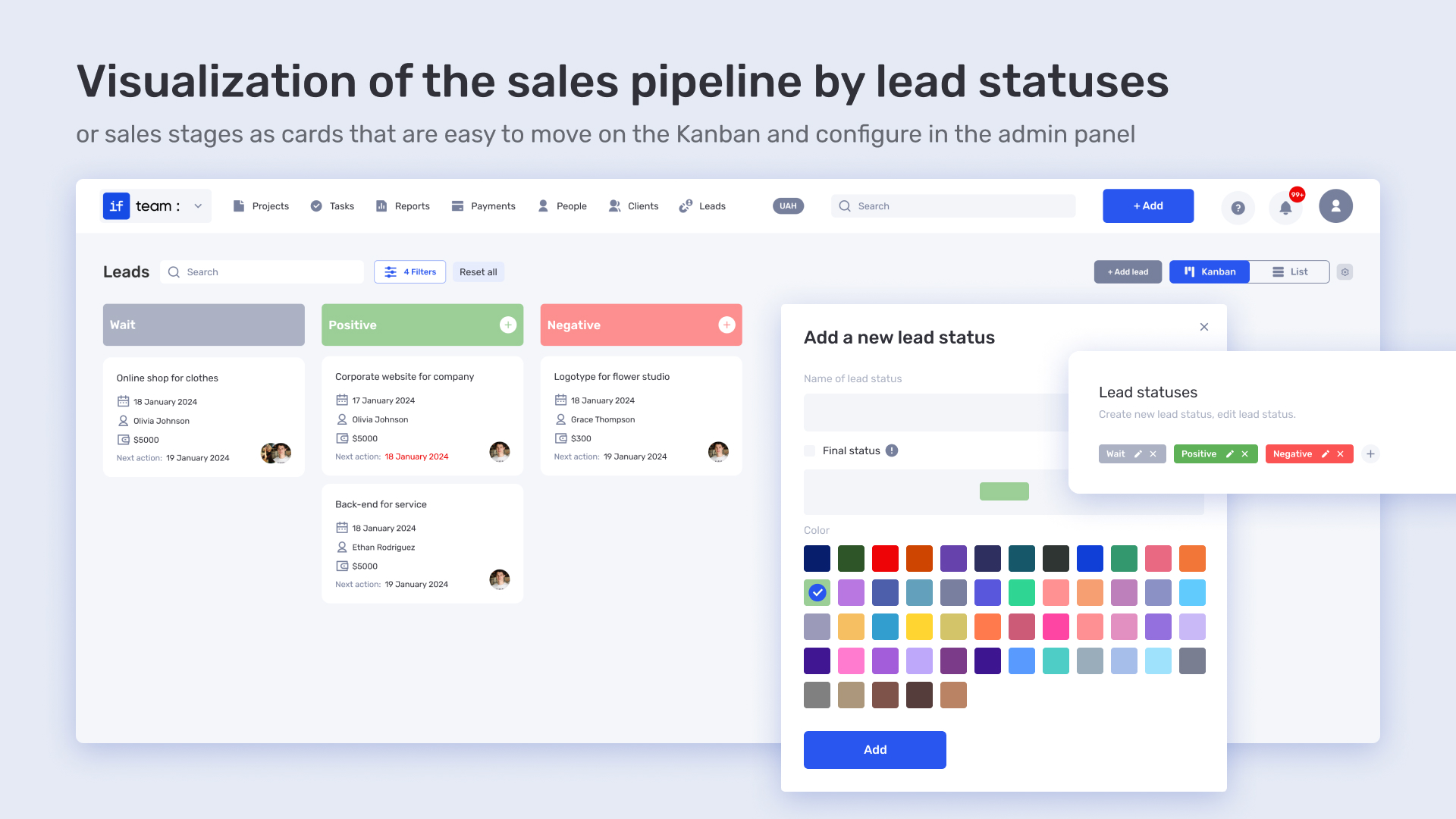
The reminder and notification functionality enables managers and financial officers to set up alert systems, reducing the likelihood of financial difficulties and ensuring a stable cash flow for the business. Tracking payment status helps the business maintain transparency with clients and partners, improving interaction and ensuring timely fulfillment of financial obligations.
Before choosing a PSA for small business, it is important to clearly define the main needs of your company. This will help you find the optimal solution that aligns with your goals and resources. Here are a few key aspects to consider:
In this context, if.team is an advantageous solution for professional services automation for small business and IT companies, as it combines intuitiveness, flexibility, and the functionality needed for effective daily operations.






Automate. Grow. Achieve more.
Try if.team for free and see the results.