Project Management Tool for Freelancers: How to Choose a Platform for Remote Work
Vladyslav Chesnokov
Copywriter, if.team
Oleh Frolov
CEO, if.team
A well-chosen project management tool for freelancers is the key to optimization. Modern freelancing is becoming increasingly complex: simply completing tasks on request is no longer enough. Hiring contractors, scheduling, assigning tasks, and creating financial reports — these are just a few responsibilities freelancers face.
Traditional task managers or even good old Excel can’t handle this workload. You need a tool that covers every aspect of freelance work. if.team is more than just a helper — it’s an all-in-one platform. It helps you manage client interactions, task execution, and financial planning. All essential components are available in one window — convenient and free from unnecessary chaos.
Challenges freelancers face without an all-in-one project management tool
Without a reliable project management tool for freelancers, it’s hard to maintain fully controlled, well-coordinated operations that truly support business growth. Let’s take a look at the common issues freelancers encounter when managing remote work.
Communication breakdowns
Imagine juggling conversations across five platforms: email, messengers, comments in cloud docs, maybe even a stray note on your phone. Now imagine trying to recall which client said what about which project. Without a centralized space — the kind only an all-in-one platform provides — vital information scatters. Confusion takes root. Team alignment suffers. And clients? They notice.
Lack of focus and lost priorities
With no bird’s-eye view of deadlines, progress, or goals, the workday turns into a blur. You’re ticking off small tasks just to feel productive, while long-term objectives fade into the background. It’s not just inefficient — it’s exhausting. The freelancer feels stuck in a loop of busywork. The client gets subpar results. No one wins.
No transparent tracking
Multiple projects, overlapping timelines, and zero clarity — sound familiar? Without visibility into time spent per task or per project, freelancers lose track of hours, and clients lose trust. There’s no shared reality. Deadlines slip. Expectations clash. And that “simple” project becomes a logistical mess.
Unclear resource allocation
When you don’t know what truly matters, everything feels urgent. But not everything is. Without prioritization tools built into a project management tool for freelancers, energy drains into low-impact work. Important deliverables get delayed. Small teams — or solo operators — feel this most: burnout looms, and the work suffers.
Financial friction
Lack of centralized tracking for income and expenses is a classic pitfall. Many freelancers don’t even realize which collaborations are truly profitable and which ones are silently draining their time and energy. Tiny miscalculations, late invoices, duplicate payments — all of it snowballs into financial chaos. Without a project management tool for freelancers that integrates financial oversight, the numbers often lie.
Insufficient reporting
Let’s be honest: most freelancers aren’t crunching weekly reports. But without clear insights — what’s been done, how long it took, and what drove real results — you’re flying blind. Reporting isn’t just for big businesses; it’s a trust-builder. It’s what helps you show clients progress, and yourself — growth.
Scattered tools, scattered mind
One app for chat, another for tasks, a third for tracking income — it might seem manageable at first. But context-switching eats time. Data gets duplicated. Notes go missing. Soon you’re digging through five apps just to prep a simple client update. Fragmentation slows everything down — and raises costs. An all-in-one solution streamlines not only workflows, but your peace of mind.
No room to grow
Eventually, the ceiling hits back. Deadlines slip. You’re juggling more clients than capacity allows. What once felt exciting now feels overwhelming. Without automation, without systematized processes — the kind a project management tool for freelancers provides — scaling is off the table. And when you can’t grow, you burn out.
Manage all your projects in one place
One tool instead of a dozen spreadsheets. Clear deadlines. Nothing forgotten, nothing overlooked.
How to choose a project management tool for freelancers
A project management tool for freelancers should be flexible, intuitive, functional, and offer automation, all while being priced within reach. Let’s dive into each of these factors in more detail.
Functionality
Freelancers need more than just a task manager. Their regular work involves planning, quality control, reporting, finances, negotiations, and delegation. The platform must support:
Financial tracking: from income and expense control to financial planning.
Reporting: from automatic report generation for various queries to transaction history outputs.
Client communication: not just a chat, but the ability to leave comments on tasks.
Full project cycle management: from planning to execution and payment, tailored to the specifics of the project.
Contractor and team support: roles, access levels, and collaborative task execution.
Document management: the ability to store briefs, technical specifications, and contracts within the project.
With if.team, this is all built-in: project, tasks, budget, contractors — everything in one place. No need to jump between services, it’s all at your fingertips.
Functionality
Every freelancer works in their own way. Some thrive on clear deadlines and detailed tasks, while others prefer to work intuitively. One specialist might opt for a solo format, while another always assembles a team. A project management tool for freelancers must support any working style without forcing a change in habits. With if.team:
You can start solo and gradually bring in specialists as the project grows.
The system allows flexible role customization — from admin to executor.
It’s easy to manage multiple projects simultaneously without losing structure.
Each new project can have its own methodology applied — for example, Kanban works great for a marketing campaign.
Even when the team changes, the tool maintains process integrity — new members can seamlessly join the workflow.
Simplicity
The tool must be intuitive from the start. No need for tutorial videos, instructions, or hours of adaptation. Spending time on settings is exactly what an efficient freelancer doesn’t want to deal with.
With if.team:
The interface is designed with freelancers in mind — nothing extra, just what’s needed for work.
Quick setup with no complicated instructions: sign up, and you’re ready to go.
Smart tips help even beginners navigate the platform.
Pre-made templates for common tasks and processes: invoicing, signing contracts, approving designs.
Automatic reminders ensure deadlines are never missed.
Clients can be invited to the project simply by a link, no extra registrations needed.
This set of tools is a great choice, regardless of the freelancer’s specialization.
Pricing
The financial aspect is critical for freelancers. The platform should provide maximum value even in the free version. if.team offers:
A full-featured free version for 7 days, with access to key functionality and the ability to add up to 10 participants.
Fixed pricing plans — tailored to the number of team members.
Modern technologies — including an AI assistant in the “Premium” package.
Discounts of up to 20% for subscriptions lasting 3 months or more.
Transparent pricing updates — expand functionality as work volumes grow.
There’s also a separate “License” plan, offering the use of a dedicated server and custom integrations and modules as part of the package.
Automation
Less manual work means more time for projects. The system allows you to:
Create one template for recurring tasks, so you never waste time copying manually.
Automatically generate reports for any selected period — for yourself or your clients.
Set up recurring payments, invoices, and payment reminders.
Track the real-time budget burn rate, clearly showing the effectiveness of your strategy.
Receive push notifications and weekly summary emails without extra setup.
Build action chains — for example, once a task is closed, an invoice is automatically generated for the client.
Using templates greatly simplifies project management for freelancers, as specialists encounter typical tasks at various stages of their work.
What problems does if.team solve for freelancers
Finding the right project management tool is a crucial step. When you find the right one, it can make your work much more efficient. Modern software will eliminate many common problems by automating processes and reducing your workload. The all-in-one approach is the key to success for such products.
Financial control
Many freelancers still manage finances in Excel or a notebook — that’s inefficient. if.team has a built-in financial module that allows you to:
Track income and expenses by days, weeks, and projects.
Manage client payments with automatic confirmations.
View financial summaries for each project and your business overall.
Plan budgets and financial goals based on analytics.
Financial control is enabled through automatic reports. You can get these reports with just a few clicks. Detailed analysis helps you plan your profits and avoid financial pitfalls that often happen when there’s no control.
Flexible work planning
Sometimes, projects require a detailed plan with specific stages; other times, quick changes and improvisation are needed. if.team supports:
Kanban-style work for visual task control.
Sprint planning with clear timelines and scope.
Daily and weekly task scheduling for everyday planning.
Setting priorities and deadlines to maintain focus.
You can easily adapt your workflow to your needs, rather than adjusting to the tool.
Reports and analytics
Automated reports free freelancers from repetitive tasks. Simply set the parameters — and you’ll get the report in a convenient format. Statistics on clients, projects, profits, and expenses are just a few clicks away. This enables you to identify weak points and strengthen the areas where you’re excelling.
Team and clients
When freelancers decide to bring in other specialists, controlling the process smoothly becomes an absolute necessity. This is where the project management tool for freelancers like if.team steps in. You can assign specific roles, set access permissions, and easily track who’s doing what and when — all in one place. But that’s not all: invite your clients into the shared workspace, so they can monitor progress, approve tasks, or even leave feedback on the spot. No more juggling between different platforms to manage contractor collaboration metrics. It’s all streamlined, simple, and convenient.
Integrations and the All-in-One approach
Freelancers often juggle multiple tools: Trello, Notion, Google Sheets, various billing services — the list goes on. But here’s where it gets interesting — if.team consolidates all those functions into one seamless platform: task management, financial tracking, document handling, and reporting. It’s not just about saving costs; it’s about minimizing the friction of constantly switching between tools. Everything works together as one cohesive unit. No more hopping between different systems. The integrated financial features are key, especially when it comes to evaluating the profitability of your projects.
Control time, not chaos
Use if.team for freelancing and boost your efficiency.
For a freelancer, it’s crucial to have a tool that not only manages tasks but also ensures all other aspects of work, like financial control, planning, and collaboration with team members or clients. In this context, if.team becomes a powerful all-in-one solution. The platform integrates all necessary functions into one window, allowing the freelancer to focus on what matters most — the results. Let’s take a closer look at several key benefits of working with if.team.
One tool for everything
No need to switch between different services and tools. if.team combines all functions in one place, significantly simplifying project management for freelancers.
Advantages of a Single Project Management Tool for Freelancers:
Time Savings: No more wasting time switching between tabs and platforms.
All Data in One Place: Reports, communication, finances, and tasks — everything in one system.
Efficient Project Management: For each task, you have access to all its elements — from budgets to comments.
Minimized Human Error: No more transferring data between different services.
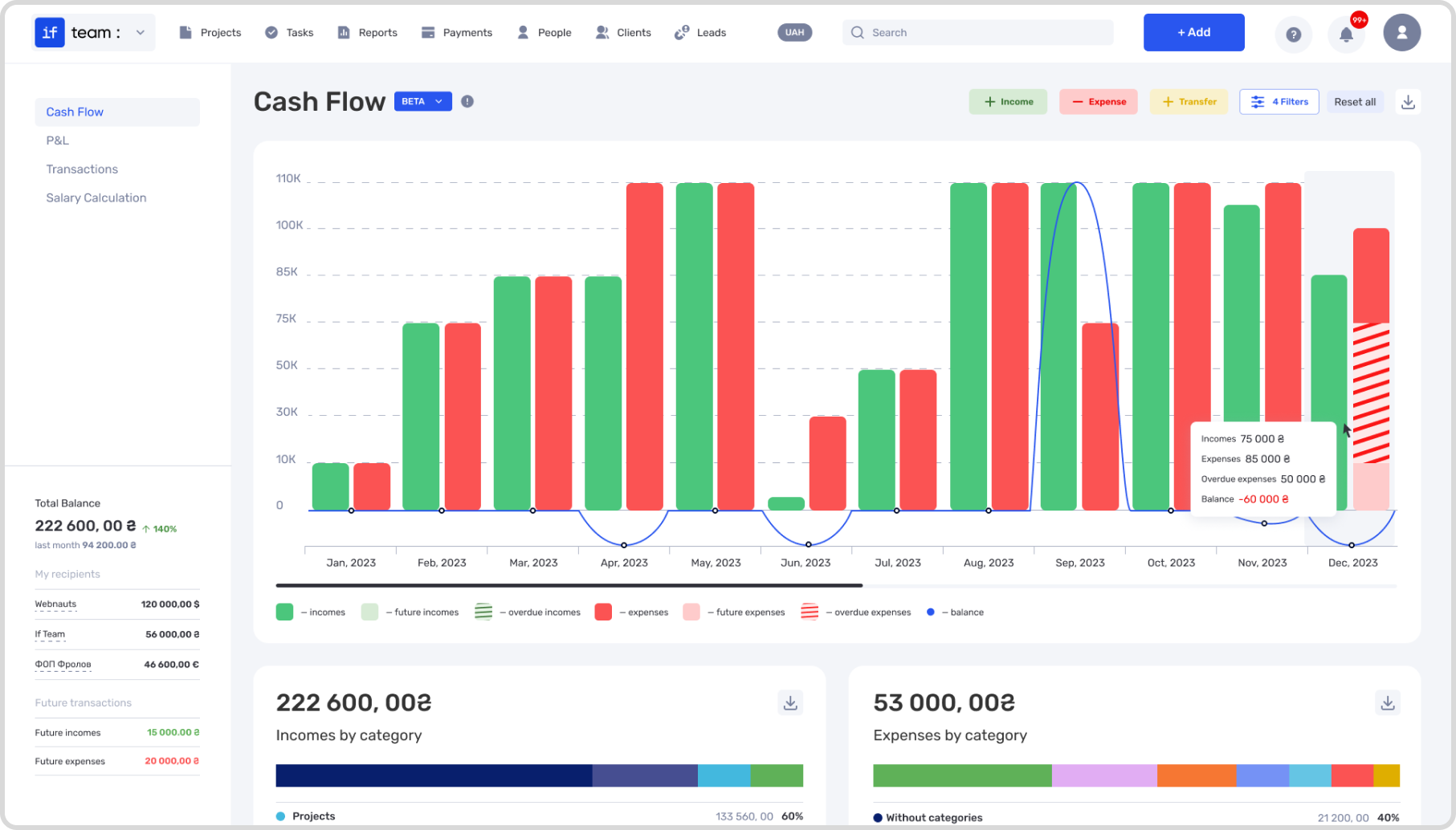
Here’s an example. Let’s talk about the company SolidWay, which provides outsourcing services. Their employees were facing challenges as they needed to use multiple tools. Together, these tools allowed them to manage projects, finances, and communication with clients. After switching from Jira to the ERP system if.team, they were able to save time by consolidating all processes into one platform. The efficiency of business processes significantly improved since now HR, financial control, and task management tools are all in one place. Interactive reports like Cash Flow and P&L help monitor financial indicators, and the workload calendar ensures tasks are distributed effectively.
Flexible task management
Not all projects require the same approach to task management. One of the major advantages of if.team is its flexibility when it comes to handling tasks. The platform allows you to use various management methods, from simple to-do lists to more complex approaches like Agile or Kanban.
Task lists
Simple task management: you can create tasks sorted by priority, deadlines, or other criteria.
Ease of status changes: from “Completed” to “In Progress.” Freelancers can add custom statuses and modify them to fit their needs.
Kanban
Visualizing the workflow through Kanban boards, where each work stage is clearly marked.
Perfect for projects where tasks change quickly and progress visualization is required.
Easily adaptable to the individual needs of each project or freelancer.
Flexibility in working methods
You can adjust your approach depending on the type of project. For example, Kanban works well for one project, while Scrum might be more fitting for another.
Ideal for freelancers working with various types of clients and projects.
Real case example. A CGI studio specializing in 3D visualization turned to if.team to optimize project management and increase process flexibility. Previously, the team worked with multiple services, making coordination, tracking statuses, and collaboration between members difficult. Using if.team, the studio began breaking tasks into smaller parts. This helped make goals more specific and simplified control processes. Managers can now easily track the stages of each task and respond promptly to delays.
Financial control in the system
One of the biggest challenges for freelancers is proper financial management. Most task managers don’t offer built-in functionality for tracking income and expenses. In if.team, this problem is solved through a dedicated section for financial tracking. With the collected data, you can not only manage tasks but also control the financial aspects of your project.
Income and expense tracking
All information about payments, profits, and expenses is stored in one system.
You can see how much you’re earning and spending on each project, and track the remaining budget.
Integration with accounting reports
The platform automatically generates financial reports for both clients and yourself.
It’s easy to create invoices, track their payment status, and monitor transaction history.
Forecasting and analytics
if.team allows you to forecast project profits based on current expenses and income.
Automated reports help track financial performance, which allows you to adjust project management strategies for freelancers.
For example, Obriy Design Büro, an independent Ukrainian design agency working with local and international brands, turned to if.team to streamline their financial processes and get a unified system that combines creative flexibility with strict resource control. Obriy Design Büro didn’t just get an ERP system but a flexible tool. Now, creative freedom is combined with financial responsibility. Transparent project-level budgeting and actual expense tracking have been implemented, along with automated reporting and integration of analytical tools.
Why if.team is the project management tool for freelancers
if.team is the answer to the modern challenges of freelancing. The platform allows you to:
Avoid chaos in tasks — with a user-friendly interface and templates.
Control finances without additional services — everything is built-in.
Work with clients and contractors in one space — without fragmentation.
Choose a planning approach that fits your working style — and easily change it.
Getting started is easy:
Register on the if.team website.
Take advantage of the opportunity to schedule a meeting at your convenience, where we’ll answer your questions and help you decide the right plan.
Create a company and set it up — if needed, we’re here to assist you.
if.team is a project management tool for freelancers that’s definitely worth trying. It will become a reliable assistant for your business, offering a personalized approach and support during the initial integration phase. One of its standout features is the development tailored to the nuances of remote work.
What is a KPI in simple terms? It’s one number or several numbers that show whether you’re actually moving toward a specific goal. Not how many actions you took, but whether a result appeared.
A KPI...
A bottleneck in business is the point where a process actually slows down. Not formally, but in reality. This is where tasks pile up, waiting time increases, and the entire system starts working more...
The RACI matrix helps teams quickly agree on who does what in a project: who performs the work, who is accountable for the final result, who provides expertise, and who needs to receive updates. When...