Published October 15, 2024, in if.team blog

Vladyslav Chesnokov
Copywriter, if.team

Oleh Frolov
CEO, if.team
if.team is an advanced service for project management and flexible task scheduling. Simplify teamwork, implement projects faster, and monitor company expenses in real time.
Ideal for project-oriented businesses, small PR and marketing agencies.
Small businesses often face various challenges when it comes to project management. These difficulties can hinder the company’s work and growth. Let’s take a look at the main challenges small businesses face.
Problems in Project Organization
Small companies typically operate without clear plans and systems, and executives and managers don’t always know how to manage projects properly. This causes confusion in the work, tasks are completed late, and clients are dissatisfied. In addition, employees are regularly overloaded with various tasks and don’t have time to do everything on time.
Inaccurate Performance Evaluations
Small businesses frequently misestimate how much time and effort a project will take. They forget to take into account possible problems and “invisible” work like meetings or bug fixes. As a result, projects are delayed, more money is spent than planned, and the team is stressed.
Lack of Clear Reporting
Small businesses often don’t have a clear reporting system. They don’t know what numbers are important to track and how to clearly show the results of their work. Many still do reports manually, which is time-consuming and can lead to errors. This makes it difficult for managers to understand how things are really going and make the right decisions.
Difficulties with Team Management
In small companies, employees typically have to perform many tasks. At the same time, they have fewer chances for training and career growth than in large firms. It can be difficult to establish team communication, especially if people work remotely. All of this can lead to poorer work performance and employees feeling tired and dissatisfied.
Inefficient Resource Management
Small businesses typically don’t keep track of their expenses in real time. They don’t always understand how much money they spend and earn on each project. As a result, there may not be enough money for salaries or necessary purchases. It happens that a company takes on a project and then finds out that it is unprofitable.
Overload of Services
Small businesses often use many programs to operate. The information is scattered in different places, and it’s hard for employees to communicate and find the data they need. This not only takes time but also leads to mistakes. In addition, paying for all these services can cost a lot of money.
Streamline your workflows and take control of your business budget with if.team
Small businesses typically face various challenges when it comes to project management. These difficulties can hinder the company’s work and growth. Let’s take a look at the main problems that small companies face.
Company and team management is one of the key tasks for any business. Employees must be properly organized and assigned specific roles, and information about them must be accessible and up-to-date. That’s why if.team provides tools for creating a structured and efficient work environment. Let’s take a closer look at the functions.
Creating a team and assigning roles are the first steps in organizing the workflow. If the roles and responsibilities of employees are not clearly defined, it can lead to confusion, double work, or missed tasks.
Inside if.team, we can create roles in the company and set up access for each of them. This will help you get rid of the routine and not have to go to the employee pages every time and do everything manually. It is enough to specify their position, and then open the customization of accesses and capabilities within the ERP system. To do this, you need to go to a separate page and open the necessary functionality for all participants with this role at once.
In if.team, you can create a team and assign a specific role to each employee, whether it’s a designer, copywriter, project manager, or any other specialist. This allows you to clearly distribute duties and responsibilities among team members, which contributes to more efficient work.
Without up-to-date information about employees, such as contact details, type of employment, and date of birth, HR management becomes difficult and inefficient. If one of the managers needs to contact an employee with whom he or she hasn’t worked before, it will take a lot of time. They will need to contact colleagues, wait for a response, and then write to the right employee.
if.team helps to get rid of unnecessary communications and significantly speed up work. Managers can enter detailed information about each employee, including phone number, email, type of employment (full or part-time), date of birth, and other important data.
At the same time, each of the managers or project managers can view this information. But you can also give this opportunity to ordinary employees if you specify it in the team settings.
Quick access to employee work history helps with productivity analysis and workload planning. Without such information, it’s difficult to understand who works how much and how to distribute tasks. The calendar feature in if.team allows you to track when and who works and view the work history of each employee.
Each employee can view their schedule for several months in advance, select vacation dates, or request sick leave for missed workdays. Managers receive notifications in the system and decide whether to approve or reject the request, taking into account the tasks and workload of the team.
After the request is approved or rejected, the employee receives a notification. If the vacation dates are not agreed upon, we make sure to contact the employee to explain the situation. For example, if an employee unexpectedly decides to take a vacation for the entire next week, it is better to discuss this decision before it is approved.
The overall team structure is important for understanding the organization and distribution of roles within the company. Without a visual representation of the team structure, management can become chaotic. The team structure section in if.team displays the hierarchy and departments, which helps to better understand the organization and distribution of roles.
In if.team, the company structure is presented in two ways – as a list and as a tree map. Although you can use both options at the same time, we usually choose the second one because it is more convenient for adding new employees, assigning them to departments, and keeping track of all connections.
By default, this tree map is available to all team members. However, if.team gives managers the ability to customize access by defining what each employee can see, create, edit, or delete in the system. For example, we typically give project managers access to edit and delete tasks, assign responsibilities, and access reporting and analytics to track project progress.
Setting an hourly rate is important for calculating payroll and managing expenses. Without a clear understanding of how much an hour of work costs for each employee, financial management becomes much more difficult. That’s why if.team allows you to set an hourly rate, specify the exact amount and currency. At the same time, you can set a separate hourly rate for each project or edit it at any time.
This payment flexibility allows you to customize employee compensation, cost accounting helps in managing financial resources, and transparency provides a clear understanding of labor costs.
Organizing tasks and projects is an important aspect of business management. The if.team ERP system offers convenient tools for creating and managing projects that help to facilitate and increase the speed of work organization. Let’s take a closer look at each of them.
The system allows you to create tasks and makes it easier to delegate responsibilities. You can specify a lot of information inside the task and add subtasks.
Creating a task inside if.team helps you to detail the work and delegate responsibilities. When you create a task, you can specify its name, status, iteration, and project. You can then specify the project manager, the person responsible for the work, and additional participants, if necessary.
Also, on the task creation screen, you can specify the priority, time for completion, and start/end date. You can describe the task in a separate description section that supports markdown and has its own internal text editor.
Setting deadlines and prioritizing tasks helps ensure that work is completed in a timely and prioritized manner. Without clear deadlines and priorities, tasks can be completed late or inefficiently.
In if.team, you can set deadlines and priorities for each task. For example, a task may have a deadline in a month, but a high priority means that it should be completed as soon as possible. You can set a specific end time, not just a date. If the task needs to be completed by 12:00, you can specify this information inside if.team.
Creating and assigning iterations helps you divide your project into stages and monitor their progress. This division into stages makes it easier to manage projects to prevent inefficiency.
if.team supports the creation and assignment of iterations for each individual project. At the same time, tasks can be linked to iterations, for example, when creating or editing them. It’s enough to create an iteration within the project, and it will automatically be pulled into all reports and fillable fields.
Kanban for task management in if.team offers a convenient visual tool that makes the task control process more visual and efficient. Thanks to Kanban, the status of tasks is easily tracked, which improves control and increases transparency, allowing you to see all tasks in one place and greatly simplifying workflow management.
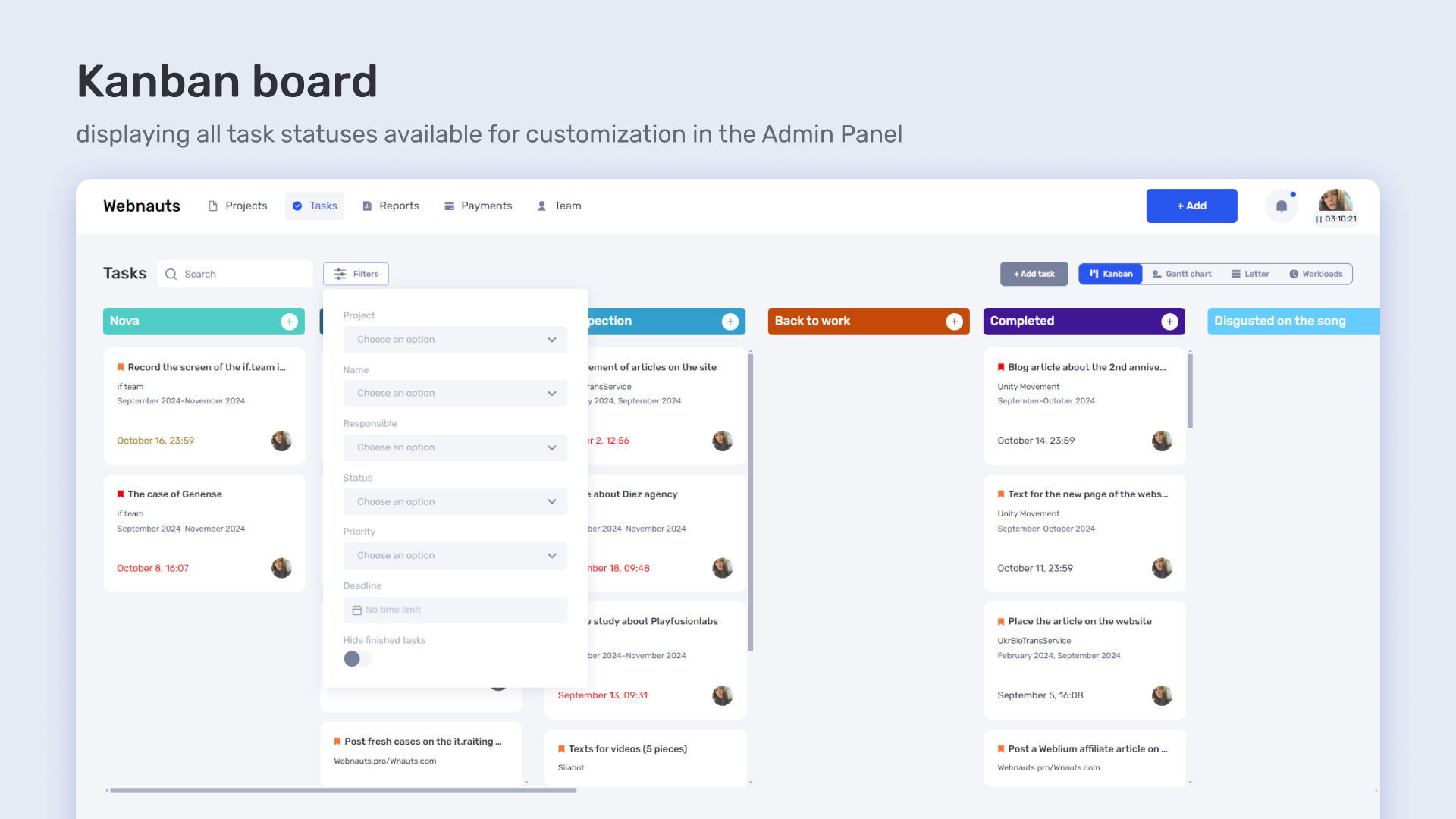
In if.team, Kanban works as a powerful tool for visual task management, providing all the necessary information in a clear and convenient way. Each card on the kanban board displays the task name, its deadline, information about who created the task and who is responsible for it, as well as the priority.
Users can add custom filters to display tasks more accurately, for example, by status, deadline, priority, or responsible employee. Clicking on a task opens an expanded window where you can see all the detailed information, add comments, attach files, change the status, or assign new participants. This makes task management transparent and convenient, providing full control over the workflow.
Streamline your workflows and take control of your business budget with if.team
Financial management is one of the most important aspects of running a successful business. if.team offers tools to optimize costs and improve financial management, which helps to minimize expenses and increase efficiency.
In if.team, you can create your own financial models that take into account all aspects of employee performance. This tool allows you to fine-tune financial conditions to the needs of your project or company.
When creating a financial model, the first step is to name it. The name will help you easily identify the model and its purpose, especially if you have several different models for different projects or teams.
The next step is to set up a working day. You can define how many hours per day will be considered as worked according to this model. It can be a standard eight-hour workday or any other option that suits a particular project or employee.
You can also set the number of available vacation days per year that will be included in this model. For example, if you want to give employees a certain number of vacation days depending on their role or project, this can be easily customized. Similarly, you can specify how many sick days are available to an employee within this model. This is useful for controlling costs and ensuring an even distribution of resources.
Another important aspect is setting up a work schedule. You can determine which days and hours an employee should work. For example, you can set a standard schedule from Monday to Friday from 9:00 to 18:00 or choose any other schedule that meets the needs of your project.
The if.team project management system offers flexible options for setting up financial models, which makes cost management more transparent and efficient. You can choose between an hourly rate and a fixed rate for completing work. For example, if a project requires the participation of designers and copywriters, you can set up a system where all designers work at one rate and copywriters at another. This allows you to adapt the payment depending on the requirements of a particular project or employee’s role.
In addition, the ability to choose a suitable payment model makes the financial management process more manageable and predictable. For example, if a project is focused on short but intensive tasks, an hourly rate may be more beneficial because it clearly reflects the actual time spent. At the same time, for long-term projects with a predictable amount of work, a fixed rate can provide more stable calculations and reduce the risk of cost overruns.
Transparency of financial models in if.team provides a clear understanding of project costs. Managers can view current costs at any time. This simplifies budget control and allows them to make quick decisions about adjustments. This functionality makes financial resource management more efficient and projects more profitable.
Real-time project cost tracking in if.team by employee provides a detailed view of costs and labor costs. Every hour spent on a task is recorded in the system, which allows you to track exactly how much time each employee has spent on tasks within a project.
When an employee works on a task, the system automatically records how much time was spent and in which project the task is located. This data includes a description of the task, start and end times, and the total time spent on it. This allows you to see the exact distribution of labor costs by task and project.
The system allows you to set up filters to select a specific reporting period or other dates. You can view data for selected time periods to analyze how resources are spent and how employees allocate their time within a project. This can include both current expenses and analysis for previous periods.
Information on expenses can be displayed both for all employees in the project and for an individual employee. This makes it easy to determine how much time each employee spent on a task and how it affects the overall project budget. You can see which employees spend more time on tasks and how this relates to the planned costs.
Thus, real-time project cost tracking in if.team by employee provides a detailed view of labor costs, helps you control the budget, and allows you to adapt project management depending on current data.
if.team’s smart assistant for real-time work control provides the manager with up-to-date information about employee activity and task status. This tool automates workflow monitoring and helps you manage your team more efficiently.
When the working day starts, the smart assistant notifies the manager whether the employee started their day on time. If the employee is late, the assistant informs the manager how much later they started working. This allows the manager to monitor compliance with the work schedule and take action if necessary.
During the day, the smart assistant tracks how much time the employee has worked and notifies the manager of significant changes in working hours. This helps to control how productively the working time is used and allows you to respond quickly to potential problems.
In addition, the smart assistant keeps track of tasks and notifies the manager when deadlines are approaching. If the deadline for a task is approaching, the assistant will tell you what to look for to prevent delays and ensure that tasks are completed on time.
When priority tasks are closed, the smart assistant also notifies the manager. This allows you to see the completion of key tasks in a timely manner and assess the progress of the project as a whole.
Correct and constantly available reporting is the key to understanding the company’s financial position. If.team software provides tools for accurate and timely reporting, which helps you make informed business decisions.Правильна і постійно доступна звітність — ключ до розуміння фінансового стану компанії. Програмне забезпечення if.team надає інструменти для точного і своєчасного формування звітності, що допомагає приймати обґрунтовані бізнес-рішення.
To display the correct schedule, it is enough to keep records within the service – enter incoming and outgoing funds, iterations, project budget, employee rates, and working hours. All this is set up from the very beginning of the project and is constantly updated in the process. If the team has one project, the data can be entered only once, and then simply updated every reporting period.
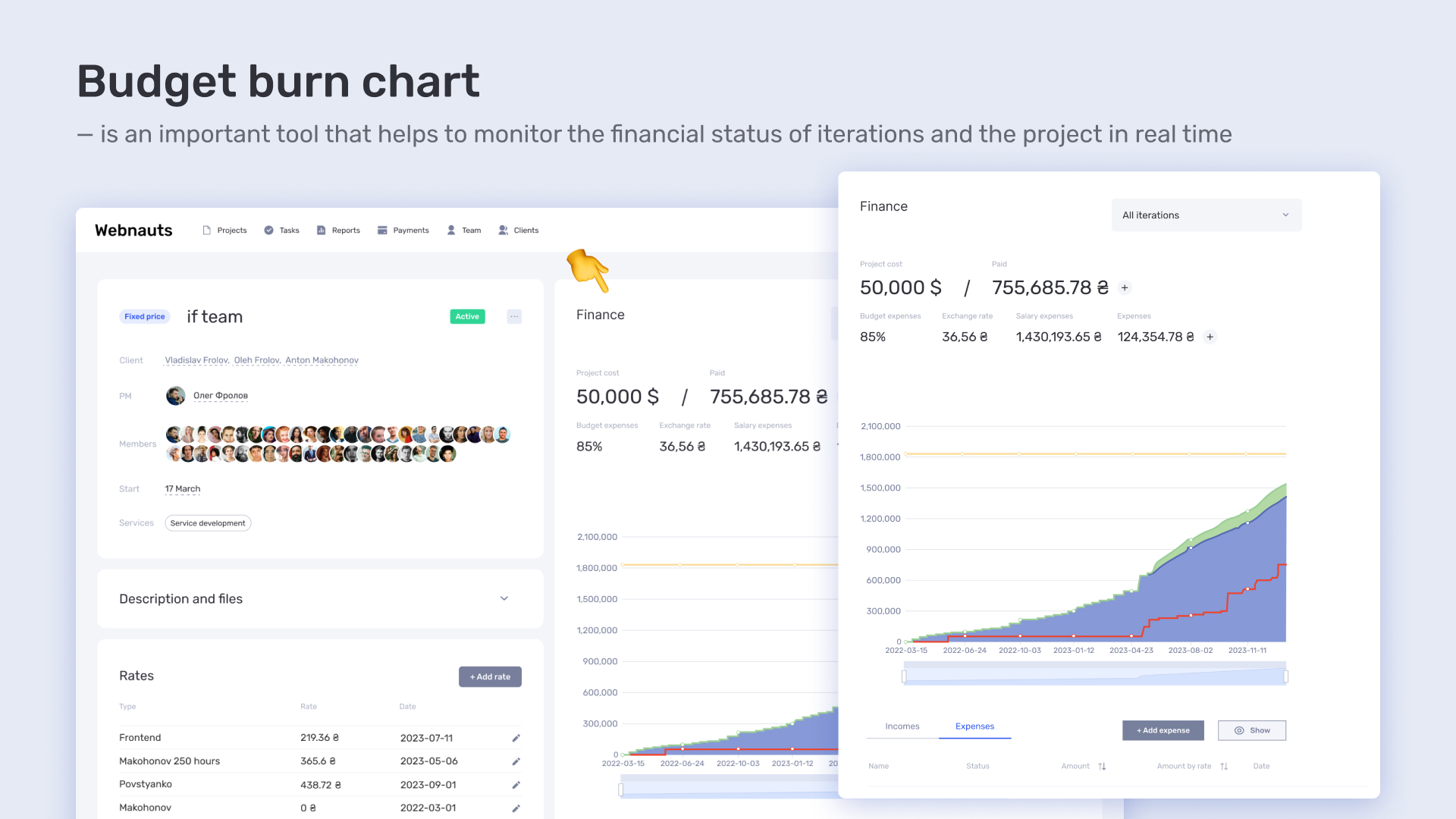
With this graph, we can see in real time how efficiently our resources are being used. A visual representation of impending cost overruns allows us to respond quickly to any budget deviations.
Transparency makes it easy to track expenses, planning helps to manage the budget effectively, and cost control ensures constant monitoring of finances.
Each project in if.team contains all the information you need to control costs. You can see the total project budget displayed on the budget burn chart. This graph is updated in real time, showing how funds are spent as the project progresses. A visual representation of expenses helps to immediately identify if the project is approaching budget overruns, which allows you to make adjustments quickly.
Within a project, you can view and manage a list of tasks. Each task is associated with certain costs, and its completion also affects the overall project budget. if.team displays how much time and money was spent on each task, which allows you to accurately track costs for each project element.
Iterations also play an important role in cost tracking. The system shows which iterations have been completed, how many resources were spent on each iteration, and how this compares to the budget plan. This helps to assess how each iteration impacts the overall costs and allows for better planning of future project phases.
All of this data is integrated to give you a complete picture of the project’s financial flows. You can see how much money has been spent, how much is left, how costs are distributed across tasks and iterations, and you can respond to any budget deviations in a timely manner. Thus, if.team expense tracking helps you maintain full control over your project and manage resources efficiently.
Tracking expenses and earnings for each employee in if.team allows you to closely monitor the financial aspects of each team member’s work and manage resources more efficiently.
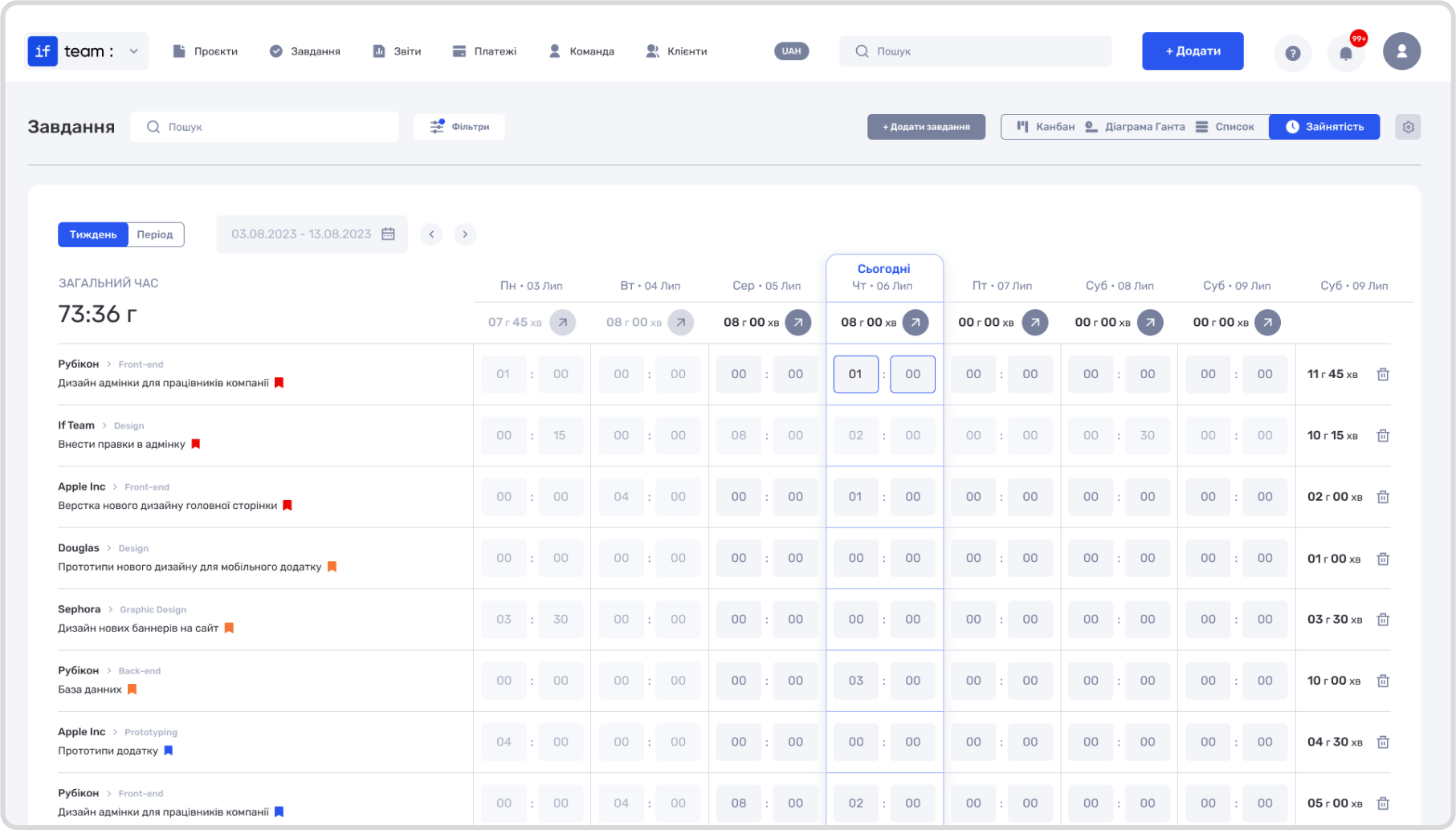
The system allows you to record and analyze the earnings of each employee, including both fixed rate and hourly pay. For each employee, you can set up an appropriate financial model that determines how their earnings are calculated. This data helps to accurately account for labor costs and correctly plan the project budget.
Every time an employee completes a task, the time they work is recorded in the system. if.team automatically calculates earnings based on a set rate or hourly rate. This allows you to see how much was spent on the labor of a particular employee in real time and helps you better manage overall costs.
The system also allows you to track how labor costs are distributed across projects and tasks. You can see how much was spent on each employee within a particular project, which allows you to conduct a detailed cost analysis. This data includes both task costs and other project-related expenses.
Reports on employee earnings and expenses can be viewed for selected periodic reporting intervals. This allows you to analyze work efficiency, determine which employees spend more time on tasks and how this correlates with their earnings.
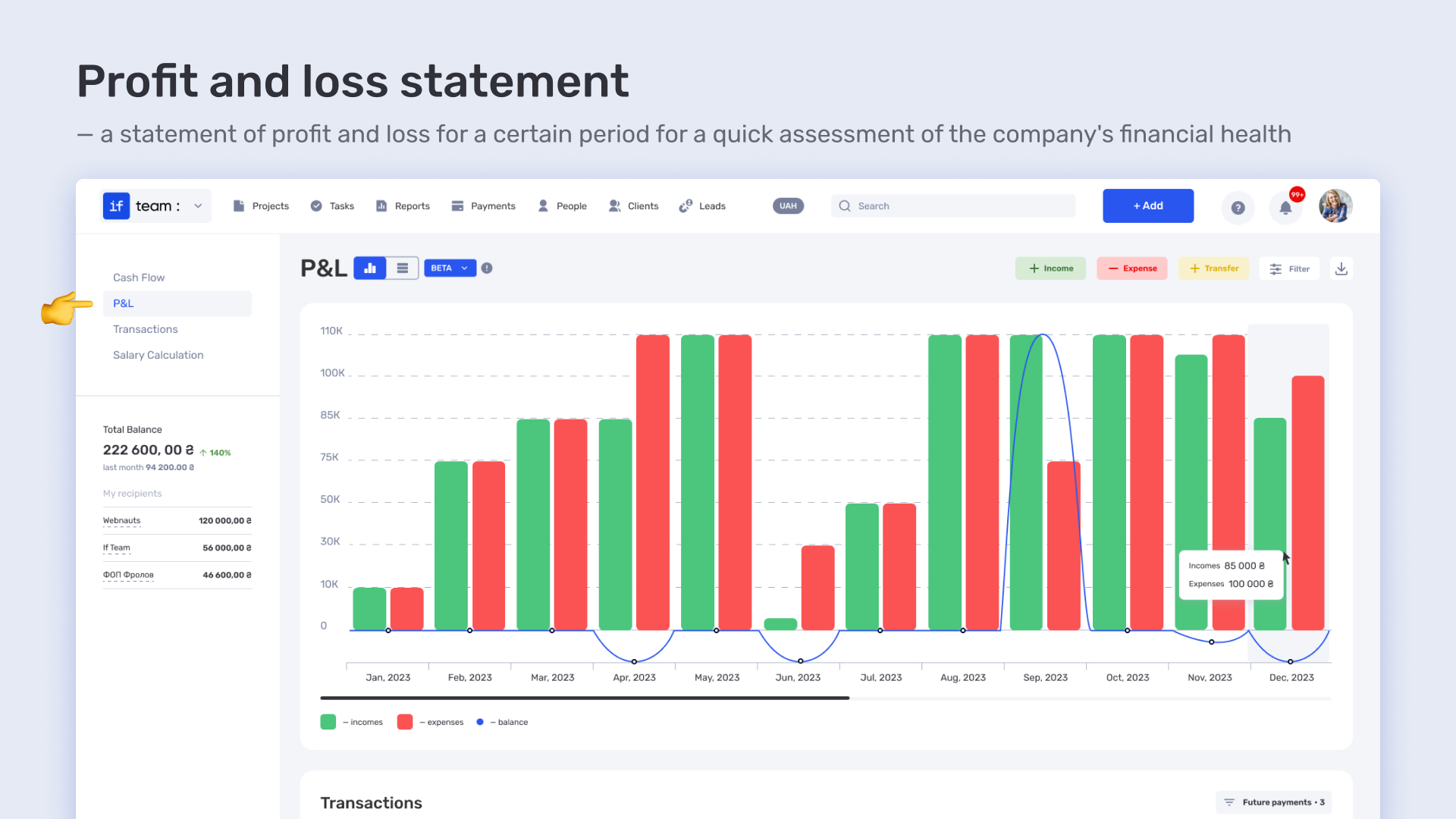
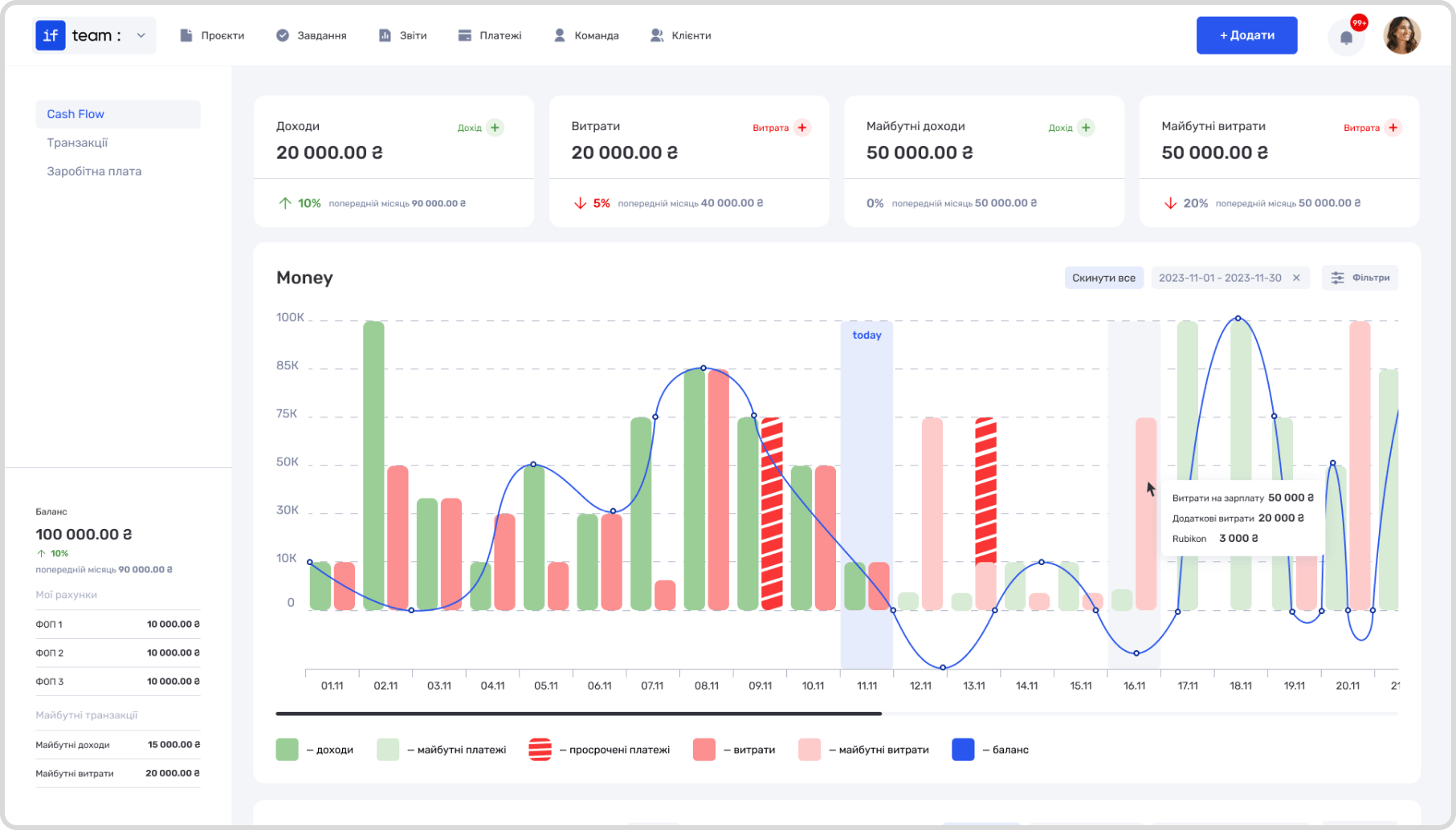
All financial transactions are automatically reflected in the Cashflow section, where you can track transactions, cash flow statements, payroll, and income and expense statements.
This feature allows us to track incoming and outgoing payments, as well as transfers between accounts, at any time. This helps to control the company’s financial flows and prevent cash gaps in real time.
The dashboard contains both actual and planned payments and expenses, including overdue and additional ones. Everything to help project-oriented companies increase revenues and avoid cost overruns before they occur.
On the same page, you can analyze income and expenses, calculate operating and net profit. This allows us, as managers, to effectively plan and forecast based on current results. All recurring income and expenses are automatically taken into account, which simplifies the financial management process.
Effective customer management is the key to the success of any business. if.team provides tools for organizing and managing customer information, which helps to improve interaction and service quality.
When you add customer information in if.team, you create a separate page for each customer. On this page, you can provide basic information such as company name, contact details, and country. This data helps you to easily identify the customer and have all the information you need to communicate effectively.
You can also add messengers and other communication tools to improve customer interaction. This can include links to emails, phone numbers, social media accounts, and messengers. This information allows you to quickly contact the customer via any convenient channel.
Additionally, you can make special comments and notes on the client’s page that may be useful to your team. For example, you can indicate the specifics of your approach to the client, preferences in work, or special terms of cooperation. This helps you better understand the client and adapt your approach to their needs.
In if.team, you can also add information about the project or tasks related to the client. This helps to track the current state of work, see the history of interaction, and manage projects more efficiently.
In if.team, you can easily track all active clients using a special section or filters. They allow you to highlight the clients you’re currently working with. This helps you focus on current projects and not lose sight of important clients.
Each active client is assigned a status that is updated in real time. This allows you to see immediately which clients are actively engaged and which may be waiting for projects to be completed or pending. You can set up filters to display clients based on various criteria, such as the date of the last interaction, project status, or priority level.
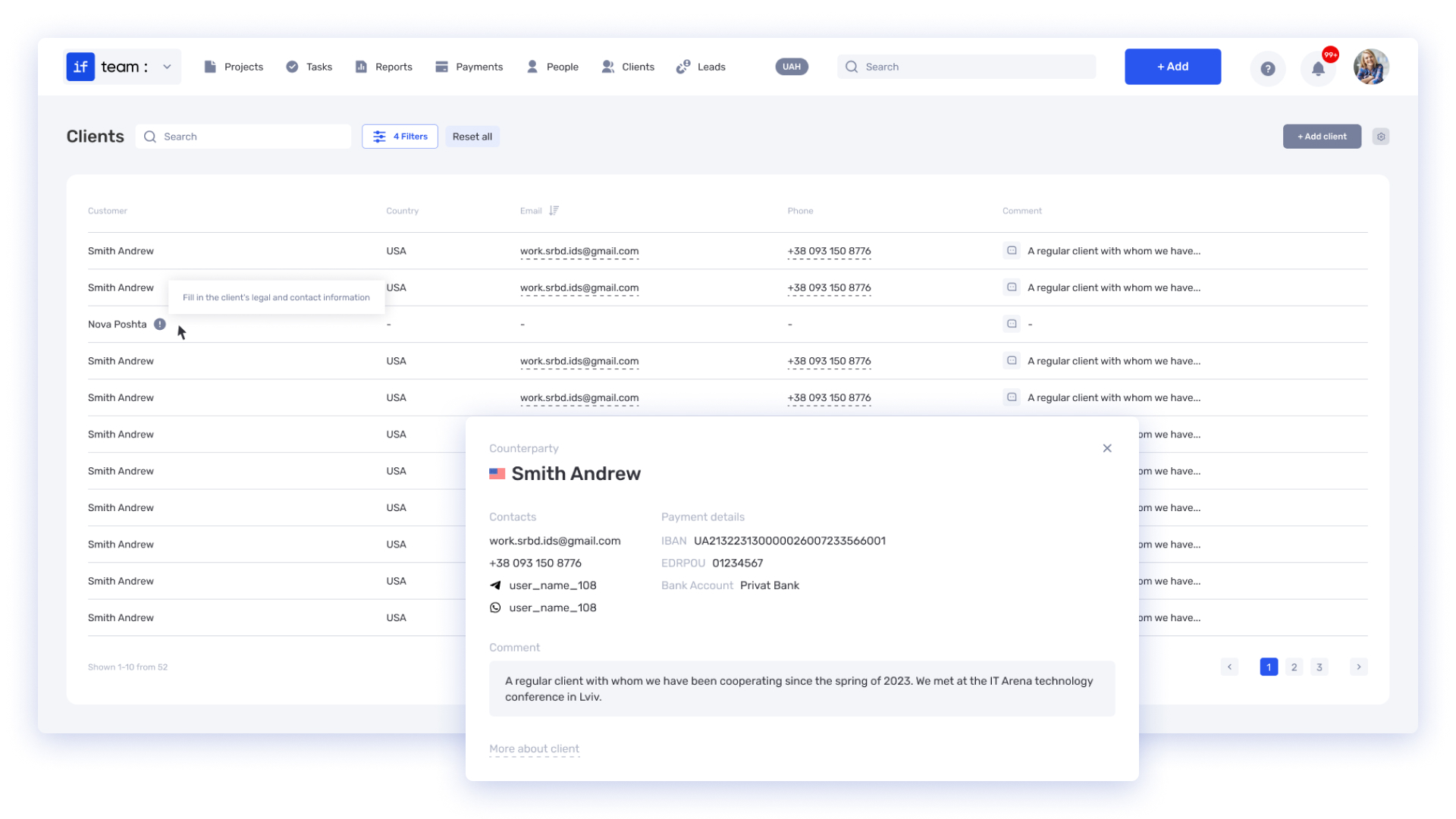
Quick access to information about active clients is provided through a centralized interface. You can view detailed information about each client, including contact details, current projects, tasks, and interaction history. This allows you to quickly find the information you need and keep in touch with customers without delay.
In addition, the system provides tools for organizing work with clients, such as reminders of upcoming meetings, project updates, and notifications of changes in client status. These features help you stay on top of all important client-related events and activities.
Payment statuses for each project in if.team provide a detailed and up-to-date view of financial transactions, which helps you manage cash flow more efficiently. Each payment in the system receives a specific status that reflects its current state. These statuses can be, for example, Pending, In Progress, Completed, or Overdue.
In the if.team interface, you can see a list of all payments on the project with their statuses. This simplifies monitoring and management, allowing you to quickly understand which payments have been made, which are still to be made , and which are pending. If necessary, you can use filters and sorting to quickly find payments with a specific status, making it easier to manage financial transactions.
if.team also provides the ability to receive notifications and reminders about payment statuses. You will be notified of new pending payments, delays in the process, or overdue payments, allowing you to respond to changes in a timely manner and prevent financial problems.
Analysis of payment statuses is made available through reports that can be customized to display data for specific time periods. These reports help to assess the financial status of the project, identify potential issues, and plan further actions.
Small businesses should realize that project management software not only simplifies the organization of work and team coordination, but also significantly improves control over resources and finances. Choosing the right tool can have a significant impact on project success, increase productivity, and reduce risks.






Combine Tasks and Finances on a Single Platform
Simplify management and track your company’s expenses with if.team